GT New Horizons · Ultimate Voltage (UV)
Research Station
The Research Station (RS) is a UV tier multiblock for scanning informational data onto data sticks, such as the recipes for Assembly Lines. The Research Station is a direct upgrade from the singleblock scanner except that it uses computation generated by a Quantum Computer (QC) in addition to power. The RS has two operating modes which the player can switch between inside the GUI of the controller or by right-clicking the controller with a screwdriver. Scanner mode is for basic scanner recipes and converts the LV duration (s) directly into a computation threshold. Research Station mode is for more advanced scans with much higher power and computation thresholds. The Research Station is first needed to craft the UHV Mainframe and remains an integral part of progression up through UXV.
Construction
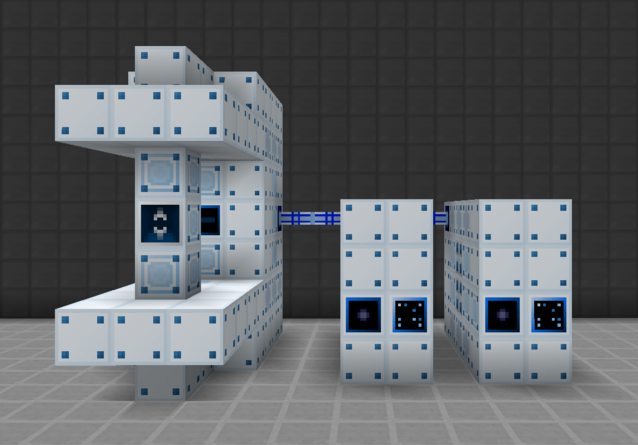
The Research Station has no tiered components. The optical reception connector and energy hatch are limited to the center nine computer casings on the back of the structure between the computer heat vents. The object holder sits directly in front of the controller and holds the item to be consumed/scanned. The remaining buses/hatches are limited to the center nine computer casings on the back of the structure or the one casing above and below the controller. The input hatch is only for a few basic scanner recipes and the output bus is for scanned data sticks. Multi-amp and laser energy hatches are supported for serious research projects. Use the Multiblock Structure Hologram Projector to visualize/build the structure.
Recall that computation is sent from optical transmission connectors, through optical fiber cable, to an optical reception connector. There is no storing computation and there can only be ONE transmission or reception hatch connected to the same optical fiber cables at a time. All optical hatches and cables must be painted with a spray can to connect.
Structure
- Controller: Front center, 4th layer
- 52-58 Computer Casing
- 23 Advanced Computer Casing
- 14 Computer Heat Vent
- 1 Object Holder: Center of the front pillar
- 1+ Optical Reception Connector: Any back center casing
- 1+ Energy Hatch: Any back center casing
- 1 Maintenance Hatch: Any back center casing, or directly above/below controller
- 0+ Input Hatch: Any back center casing, or directly above/below controller
- 1+ Output Bus: Any back center casing, or directly above/below controller
Wallsharing
Research Stations may wallshare each of their sides to save on casings and buses/hatches. The only reason to have more than one Research Station is to keep one permanently in Scanner Mode and another permanently in Research Station Mode. In that case, share the optical reception connector to provide the full computation to both machines simultaneously. The computation does not split in half because it is never actually consumed, only read.
Usage
The Research Station has two operating modes, listed below. Switch modes in the GUI of the controller or by right-clicking the controller with a screwdriver. Use NEI to determine which mode is needed for a particular data stick or recipe.
- Research Station Mode - For more advanced scanner recipes exclusive to the Research Station. Power consumption varies.
- Scanner Mode - For basic singleblock scanner recipes. Consumes 1A of UV power.
All Research Station recipes take some sort of catalyst item (placed in the object holder) and a data stick (placed in the controller). The catalyst item is consumed as soon as the Research Station begins scanning, but returns if the recipe is interrupted for any reason. All recipes also have a computation threshold, or the minimum amount of computation needed to complete the scan. The power input has NO effect on the length of the scan and exists purely to sustain the machine until it receives enough computation. Some recipes even have a minimum computation per second to force better Quantum Computer setups.
Singleblock scanner recipes are normally LV, have a set duration, and do not require computation. However, the Research Station scanner mode is different and converts the duration (s) of the original recipe at LV into a computation threshold. For example, the PCB Factory data stick originally takes 180 seconds in a singleblock scanner before overclocking so its computation threshold is 180 in the Research Station. Most scanner mode recipes finish in a single tick with a reasonable Quantum Computer setup. Scanner mode may also be used for scanning data orbs for the Elemental Duplicator.
Automation
Quantum Computers consume a significant amount of power and should only turn on when absolutely necessary. However, it can be tedious to manually toggle them before and after every scan. The solution is attaching a wireless item detector cover to the object holder of the Research Station to automatically toggle any connected Quantum Computer(s) via a wireless machine controller cover.