GT New Horizons · Space & dimensions
Rockets
 | Needs Cleanup! Some of the information is confusing or incomplete. Please help improve this article if able. More images wanted! |
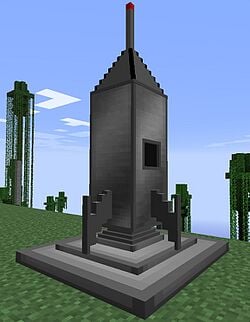
The Rocket is a vehicle added by the Galacticraft mod that enables travel to different planets. These planets often contain ore veins and underground fluid veins which are inaccessible in other dimensions and are required for Tier progression.
Rocket Tiers
| Rocket | Tier | Destinations |
|---|---|---|
| T1 | HV | Moon |
| T2 | EV | Deimos, Mars, Phobos |
| T3 | IV | Asteroids, Callisto, Ceres, Europa, Ganymede, Ross128b |
| T4 | IV | Io, Mercury, Venus |
| T5 | LuV | Enceladus, Miranda, Oberon, Titan, Ross128ba |
| T6 | ZPM | Proteus, Triton |
| T7 | UV | Haumea, Kuiper Belt, Makemake, Pluto |
| T8 | UHV | Barnard C, Barnard E, Barnard F, Alpha Centauri Bb, T Ceti E, Vega B |
| T9 | UEV | Horus, Maahes, Anubis, Neper, Seth, Mehen Belt |
The T9 planets require a Mothership and Shuttle Rockets to travel to.
Questbook
The Better Questing quest tab for rockets, "Space Race", unlocks upon completing the IV Circuits and HV Assembling Machine quests in the HV quest tab. It contains the progression for rocket tiers, space survival systems, and rocket fuels, starting with a quest to craft the NASA Workbench.
Space Travel
Building Launchpad
The Rocket requires rocket fuel and a launch pad to launch.
- A launch pad is formed by placing a 3x3 square on the ground of Galacticraft Launch Pads. Right click to place a rocket on the launch pad.
- A Galacticraft Fuel Loader can be placed next to the launch pad. It requires 91 EU/s to run. Once a rocket is placed on the launch pad, the Fuel Loader will pipe fuel from its tank into the rocket. A Fuel Loader can be filled with Galacticraft Liquid Canisters, fluid cells or piped in through a tank. All tiers of rocket hold enough fuel capacity for at least one round trip. The Tier 1 Rocket holds up to 5 Buckets of fuel.
Rocket Controls
- Interact with the rocket to enter it
- Interact again or sneak to leave it
- While on the rocket, press space to ignite the rocket and begin a launch; begins a 20-second countdown to launch, which cannot be cancelled.
- By default, the key to view the inventory/fuel of the rocket is unbound. It can be found as the "Open Spaceship Inventory" key in the Minecraft Controls menu.
- WASD to steer the rocket while it is flying.
Launch Process
During the 20-second ignition period, the rocket produces pollution/sec and will begin to shake and emit white smoke particles. After the launch begins, the launchpads will break, and the rocket will fly straight up without player steering. While the rocket is flying, it will produce pollution/sec. Note that due to a bug the rocket will actually emit 20x that amount of pollution in version prior to 2.9. A GUI indicator on the left side of the screen will display the rocket's height relative to the world. If the rocket hits any blocks, it will stall and waste fuel, requiring player steering. If a rocket runs out of fuel while launching, it will explode.
Upon reaching maximum height (y~1100 for the overworld), the player will be transported away from their current dimension and be shown a catalog of solar systems and planets. Clicking on a planet allows the player to build a Space Station there or launch there as the destination on the upper right hand side. Clicking on the planet again will zoom in on it and display its moons and space stations, which can also be launched to. The tier requirement of a launch is listed on the top of the screen; insufficient tier requirements prevent selecting a planet as a destination. The available destinations only depend on the tier of the rocket, not on the launch site.
Upon selecting a destination, the destination will be loaded in, and the player will descend riding some form of a Lunar Lander (Parachute, Lunar Lander, Landing Balloons, etc.). For the Moon, the player must press space to expend fuel and slow down the Lunar Lander to a descent rate slower than -20m/s to prevent an explosive crash landing. Upon landing, the player can exit the Lander by sneaking. The Lunar Lander will hold the rocket (with its fuel) and launchpads, used for a return flight. Punch to break it like a boat.
Moon Travel Checklist
Main Article: Moon Travel Checklist
Crafting a Tier 1 Rocket
NASA Workbench
The NASA Workbench is used to make rockets and other Galacticraft vehicles. Notable crafting components used to make the NASA Workbench include an HV Assembling Machine, 2 IV Circuits, 3 EV Circuits, Energetic Alloy frame boxes, and 6 Nether Star Plates (requiring 9 Nether Stars for a Block of Nether Star).
Implosion Compressor
The Implosion Compressor is required to craft Galacticraft compressed metal plates, which are used in rockets and oxygen systems.
Storage Rockets
In the T1 Rocket craft, there is an optional slot below the rocket control computer to add a copper, iron, or gold chest into (these recipes are also available in NEI). This will add storage space to the rocket, but it will not be detected by the T1 Rocket quest in the Space Race tab. These can be converted to the normal rocket in a crafting grid.
Crafting Tier 2+ Rockets
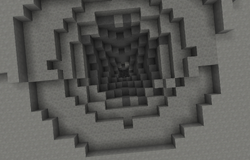
The NASA Workbench requires new schematics to craft higher tiers of rockets. These schematics are found in dungeons on planets in tier order. Tier 2 rocket schematics, for example, can be found in the reward room of Moon Dungeons. Dungeon entrances are deep holes on the surface that have unnatural brick blocks on the bottom.
The dungeons are naturally generated and so may be difficult to find. It is important to mark the location of each dungeon found as the coordinates are the same across each planet.
Higher tiers of rockets require different kinds of Rocket Fuels.
Rocket Fuels
| Fuel | Max. Rocket | Infrastructure Requirements |
|---|---|---|
| Cetane-Boosted Diesel | T2 |
Large Chemical Reactor or HV Mixer |
| RP-1 Rocket Fuel | T2 |
Chemical Plant HV/Stainless Steel |
| Dense Hydrazine | T4 |
Chemical Plant HV/Titanium |
| CN3H7O3 | T6 |
Chemical Plant HV/Tungstensteel |
| H8N4C2O4 | T9 |
Chemical Plant HV/Laurenium |
Trivia
- In 2.1.1.0 additional rocket fuels were added that could be made in the Large Chemical Reactor as an alternative to the rocket fuels made in the GT++ Chemical Plant. In 2.2.0.0 their recipes were removed, but could still be used as rocket fuels. As of 2.6.1, they no longer appear in NEI and likely have been removed.
| Deprecated Fuel | Max. Rocket |
|---|---|
| LMP-103S | T4
|
| Monomethlyhydrazine Fuel Mix | T6
|
| Unsymmetrical Dimethylhydrazine Fuel Mix | T8
|