The Vending Machine is a Stone tier multiblock for storing an unlimited amount of coins and exchanging them for various rewards. The Vending Machine does not consume any power nor does it require any maintenance. Insert/extract coins directly through the GUI of the controller and select trades by their category. All trades require one or more quests to be completed first. Optionally, replace one of the casings with an ME vending uplink hatch to connect the Vending Machine directly to an AE2 network.
Construction
The Vending Machine consists of a single type of casing and has no tiered components. The only bus/hatch is the ME vending uplink hatch which is optional and may replace any casing anywhere on the structure. The uplink hatch connects the machine directly to an AE2 network for consuming inputs other than coins, such as empty cells. Otherwise, everything is handled directly through the GUI of the controller. Use the Multiblock Structure Hologram Projector to visualize/build the structure.
Structure
Controller: Middle right, 2nd layer
4-5 Vending Machine Casing
0-1 ME Vending Uplink Hatch: Any casing
Usage
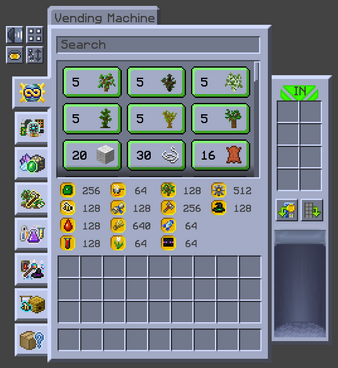
The Vending Machine stores an unlimited amount of coins and offers trades for various rewards. The Vending Machine does not consume any power nor does it require maintenance. Right-click the Vending Machine's controller to open its GUI. The top-right item slots are for inserting coins, the blocks in the middle are the available trades, the tabs on the left are the different trade categories, the coins/numbers on the bottom are the total amounts in your wallet, and the chute on the bottom-right is for retrieving outputs.
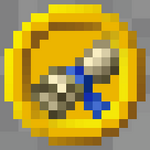
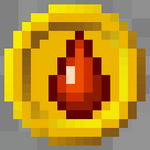
All 14 types of coins are earned through quest rewards. A few even come from repeating quests which makes them a renewable resource, but they should never be fully relied upon for progression. Their purpose is to provide small, occasional boosts similar to loot bags. The value of the coin scales with color from yellow = 1 to black = 10,000.
Vending Machine GUI
Yellow = 1
Green = 10
Blue = 100
Red = 1,000
Black = 10,000
The coins are not actually stored inside the Vending Machine so breaking or unforming the structure does NOT spill the coins all over the ground. Instead, the coins are stored inside a wallet in the cloud that can be accessed from any Vending Machine in any dimension. Although not really necessary, coins may be extracted from the wallet by shift-clicking the coin's icon or by pressing the "eject all coins" button on the right side. Ejected coins fall into the chute and are always compacted as much as possible to reduce the amount dropped at once. For example, ejecting 12,345 technician coins drops 1 black, 2 reds, 3 blues, 4 greens, and 5 yellows.
Wallets may be automaticaly shared with other players in multiplayer by forming a GTNH team. Use the following command to invite someone to your team and then click on the "Team Wallet" to share the coins. Any coins put into the Vending Machine before the team is formed should be in the Wallet by default, but may need to be ejected and re-inserted to properly share them.
/gtnhteam invite playername
Coins & Trades
The following tables list the prerequisites, inputs, and outputs of every Vending Machine trade in GTNH by coin type and tier. Notice that there is always one or more quests that need to be completed first. All of these are repeatable with a cooldown period between each trade. Cooldown periods can last anywhere between 5 minutes to 24 hours but it runs at all times including when the world/server is offline.