GT New Horizons · Insanely Ultimate Voltage (UIV)
Draconic Reactor
The Draconic Reactor is a UIV tier multiblock that stabilizes the catalytic reaction between awakened draconium and chaos. The purpose of such a dangerous and volatile undertaking is to slowly convert the awakened draconium into chaos shards for use in crafting. The Draconic Reactor also generates an immense amount of RF/t but that is negligible after unlocking the chaotic capacitor bank, and RF cannot be converted into EU anyway. Managing the Draconic Reactor is split up into three phases, listed below.
- Phase 1 - Fueling
- Phase 2 - Charging
- Phase 3 - Running
The first phase involves inserting awakened draconium through the reactor stabilizers. The second phase involves building the containment field around the reactor core with power from the energy injector. And the third phase involves balancing the temperature, energy saturation, field strength, and fuel conversion level of the reactor. Improperly managing the Draconic Reactor during the third phase can very easily lead to a catastrophic meltdown that vaporizes everything within a 200 block radius.
Construction
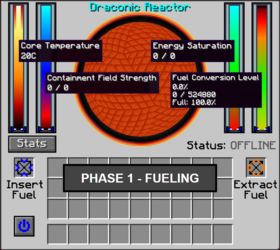
The Draconic Reactor does not have a controller or any buses/hatches and the Multiblock Structure Hologram Projector cannot visualize/build the structure. Start by placing the reactor core at the intended center of the structure and four reactor stabilizers in a ring around it, facing inwards. The ring can be horizontal or vertical and the stabilizers can be anywhere between 4-8 blocks away. Also place an energy injector 4-8 blocks away from the core on one of the remaining open sides, facing inwards. Right-click one of the stabilizers after placing everything to open the reactor GUI. If built correctly, the status should be "OFFLINE" instead of "INVALID SETUP".
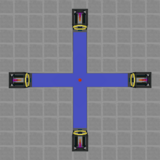
The stabilizers are crucial to the Draconic Reactor. If one is destroyed while the temperature is ≥2000°C, the field collapses and the reactor explodes in a catastrophic meltdown--vaporizing everything within a 200 block radius. It is highly recommended to build the Draconic Reactor in a separate dimension because not even warded glass contains the explosion.
Structure
- 4 Reactor Stabilizer
- 1 Draconic Reactor Core
- 1 Reactor Energy Injector
- 0-2 Flux Gate
The Draconic Reactor receives RF from the energy injector and releases RF through the stabilizers. The rate at which RF is transferred is extremely important to sustaining the reactor and requires absolute precision. Flux gates are optional but highly recommended because they can control the flow of energy in one-direction, scales with redstone signal strength, and can pull more than 500k RF/t from chaotic capacitor banks. Set the desired flow rate in their internal GUI and rotate them with a standard GregTech wrench. RF travels FROM the purple side TO the orange side.
Usage
Phase 1 - Fueling
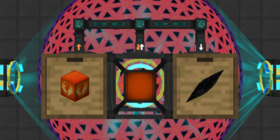
The Draconic Reactor first needs to be fueled with awakened draconium. Insert nuggets, ingots, or blocks through the reactor GUI or one of the stabilizers. View the current amount of fuel in the reactor by hovering over the fuel conversion gauge which also shows how much fuel has been converted into chaos. Fuel can only be extracted through the reactor GUI and does NOT drop if the core/stabilizers are broken. The maximum fuel capacity is 524,880 or 3,240 awakened draconium blocks.
- Awakened Draconium Nugget = 2 Fuel
- Awakened Draconium Ingot = 18 Fuel
- Awakened Draconium Block = 162 Fuel
The fuel slowly converts into full-sized chaos shards while the reactor is active. Use an item conduit or similar tool to pull the chaos shards from the stabilizers and resupply the reactor with more awakened draconium. Each chaos shard is equivalent to 26,244 fuel or 1,458 awakened draconium ingots (162 blocks). If the Draconic Reactor ever runs out of fuel and/or reaches 100% conversion level, the overwhelming amount of chaos is enough to cause the reactor to explode.
Phase 2 - Charging
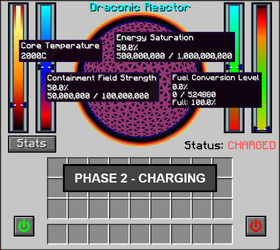
Once the Draconic Reactor is fueled, the player can initiate the charging process by pressing the blue power button inside the reactor GUI. Charging always follows the same four steps, listed below, and simply pulls RF from the energy injector to build the containment field around the core. There is nothing dangerous about this phase; the reactor cannot explode and can even be shut down immediately at any time by pressing the red power button inside the reactor GUI. The only limitation is that RF and chaos shards are NOT generated while the containment field is charging.
- Step 1) The Maximum Containment Field Strength and Maximum Energy Saturation is locked.
- Step 2) The Containment Field Strength increases to 50%. Maximum 50M / 100M RF.
- Step 3) The Energy Saturation increases to 50%. Maximum 500M / 1B RF.
- Step 4) The Core Temperature increases to 2,000°C. Maximum 10,000°C.
The maximum containment field strength and maximum energy saturation both depend on the amount of stored fuel, as seen in the following equations. The very beginning of the charging phase is the ONLY time these values are calculated even if more fuel is added to the reactor later on. It is highly recommended to completely fill the Draconic Reactor with 524,880 fuel before starting.
The length of this phase depends on the rate of energy input. The first three steps can be completed immediately if the RF/t is high enough, for example. There is no optimal input rate or anything else to worry about. Once charged, a green power button appears in the reactor GUI to start the catalytic reaction and activate the reactor. From this point forward, the reactor can only be shutdown if the temperature is below 2,001°C and it is capable of exploding if managed improperly. It is extremely important to understand how to safely control the reactor before continuing.
Phase 3 - Running
The Draconic Reactor runs all the following calculations every single tick while active, starting with the following variables. The fuel converted should never exceed 26,244 or 5% if chaos shards are extracted as soon as possible, effectively bounding the chaos% between -0.235 and -0.300.
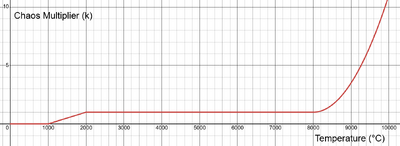
There is also the chaos multiplier (k) that depends on the current temperature of the reactor, as seen in the following table and graph. This increases the fuel conversion rate when above 8,000°C, but also the energy cost to sustain the containment field. Fortunately, flux gates can pull an unlimited amount of RF/t from a chaotic capacitor bank to prevent the latter from ever becoming an issue.
|
 |
Temperature
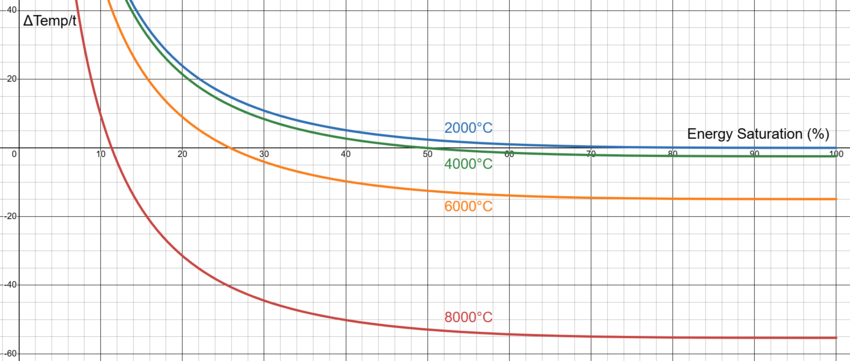
The change in temperature of the Draconic Reactor depends on the current temperature, the energy saturation level, and the chaos%, as seen in the following equation and graph. The temperature gauge only goes up to 10,000°C but there is NO maximum temperature that could cause the reactor to explode.
Notice that lower energy saturation values increase the temperature of the reactor and higher energy saturation values decrease the temperature of the reactor. Higher temperatures also have a lower threshold before the change in temperature is negative. The long run behavior is that the temperature asymptotically approaches 2,000°C as the energy saturation level approaches 100%.
If shutdown has been initiated (Status: "STOPPING") and the current energy saturation is greater than 99%, the change in temperature follows the equation below instead. This is a very special case that is necessary to bring the temperature down below 2,000°C and shutdown the reactor. The only limitation is that the fuel conversion level MUST be less than 23% for this to be negative.
Energy Saturation
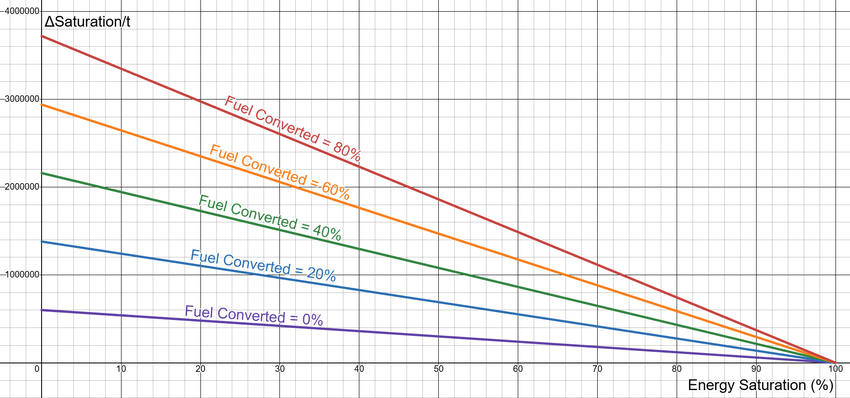
The change in energy saturation of the reactor depends on the current energy saturation level, the chaos%, and the amount of energy being extracted from the stabilizers, as seen in the following equation and graph. The max saturation is locked at the very beginning of the charging phase and should ideally be 1B RF. There is no minimum energy saturation level that could cause the reactor to explode, but nearing 0% causes the temperature to increase rapidly and raise the energy cost on the containment shield. Initiating shutdown prevents RF from being extracted from the stabilizers.
Notice that the change in energy saturation is always positive if 0 RF/t is extracted from the reactor, since it generates energy. Increasing the fuel conversion level drastically increases the amount of energy being generated, although that makes it more difficult to cool the reactor. The long run behavior is that the change in energy saturation approaches 0 as the energy saturation level approaches 100%.
Field Strength
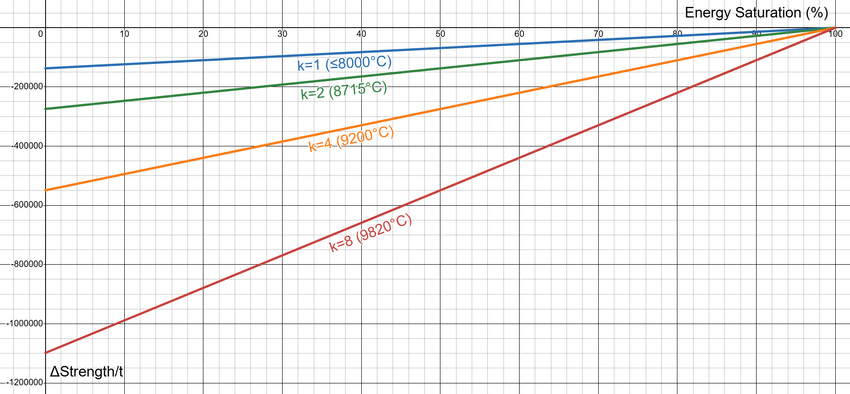
The change in the field strength of the Draconic Reactor depends on the chaos multiplier (k), the current energy saturation level, and the amount of energy being supplied by the energy injector, as seen in the following equation and graph. The max saturation is locked at the very beginning of the charging phase and should ideally be 1B RF. Stay above 0% strength to keep the reactor from exploding.
Notice that the change in field strength is always negative if zero RF/t is injected into the reactor, since the containment shield consumes energy. Exceeding 8,000°C increases the value of the chaos multiplier (k) and drastically increases the energy drain. Not shown is the reduced effectiveness of the input RF/t as the field strength increases. The long run behavior is that the change in field strength approaches 0 as the energy saturation approaches 100%.
Fuel Conversion
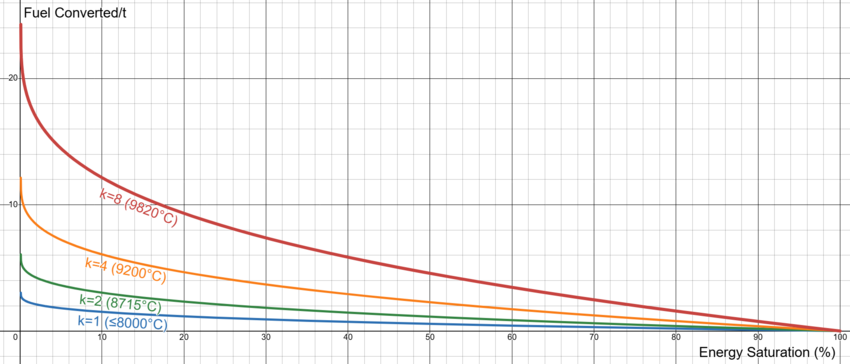
The amount of fuel converted into chaos depends on the chaos multiplier (k) and the current energy saturation level, as seen in the following equation and graph. Stay below 100% fuel conversion to keep the reactor from exploding.
Notice that the fuel conversion rate is higher for lower energy saturation levels and scales significantly with the chaos multiplier (k). The long run behavior is that the fuel conversion rate approaches 0 as the energy saturation approaches 100%.
Summary
The Draconic Reactor first needs to be fueled and charged before the catalytic reaction can start. Insert up to 524,880 fuel or 162 awakened draconium blocks, supply up to 550M RF through the energy injector, and prepare additional awakened draconium to resupply the reactor as fuel is converted into chaos shards. Once activated, the reactor can only be shutdown if below 2,001°C.
Running the Draconic Reactor means balancing the four primary variables, listed below. Each one is updated every single tick and has its own unique equation. However, only two of the four are directly controlled by the player. The energy saturation level is reduced by the RF/t extracted from the stabilizers and the field strength is increased by the RF/t supplied by the energy injector.
- Temperature - Increases at lower energy saturation levels and decreases at higher energy saturation levels.
- Energy Saturation - Generally increases, especially for higher fuel conversion levels and lower energy saturation levels. Reduced by the output RF/t.
- Field Strength - Generally decreases, especially for higher temperatures and lower energy saturation levels. Increased by the input RF/t.
- Fuel Converted - Faster at higher temperatures and lower energy saturation levels.
The sole purpose of the Draconic Reactor in GTNH is to convert awakened draconium into chaos shards, or maximizing the fuel conversion rate. That means increasing the temperature of the reactor and lowering the energy saturation level as much as possible. The problem is that both of those things increase the power consumption of the containment shield and limit the cooling of the reactor. The solution is to provide as much power as possible to the energy injector, keep the fuel conversion level as low as possible, and reduce the amount of RF/t being extracted whenever the temperature climbs too high. See the automation section below for more details on automating all that.
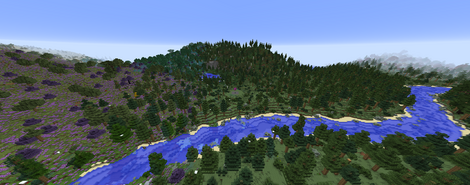
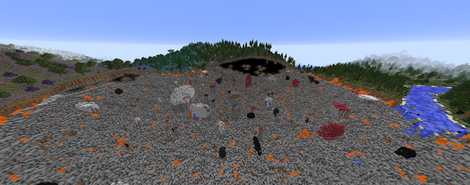
This is the final warning to be very careful with the Draconic Reactor. If managed improperly, it explodes in a catastrophic meltdown that vaporizes everything within a 200 block radius, including warded glass and other "blastproof" blocks. The following are the only three conditions that could cause an explosion. Note that there is no maximum temperature or minimum energy saturation level.
- Do not break the energy injector or one of the stabilizers while the temperature is ≥2000°C.
- Stay above 0% Field Containment Strength.
- Stay below 100% Fuel Conversion Level.
 |
 |
Automation
There are two ways to gather information about the current state of the Draconic Reactor. The first is by placing a vanilla redstone comparator next to one of the reactor stabilizers and sneak right-clicking the stabilizer to select the desired variable to measure. The strength of the redstone signal scales with the level of the variable. For example, the signal strength when measuring temperature is going to be around 7 or 8 for a reactor at 5,000°C.
The second way is by placing an OpenComputers adapter next to one of the reactor stabilizers and calling the data in a script. The following are the available methods to measure all the different variables. This is superior to redstone signals because it receives exact numbers and can even change the state of the reactor, although it is certainly more complex.
local component = require('component')
local reactor = component.draconic_reactor
local data = reactor.getReactorInfo()

local temperature = data.temperature
local fieldStrength = data.fieldStrength
local maxFieldStrength = data.maxFieldStrength
local energySaturation = data.energySaturation
local maxEnergySaturation = data.maxEnergySaturation
local fuelConversion = data.fuelConversion
local maxFuelConversion = data.maxFuelConversion

reactor.chargeReactor() -- Initiates Charging
reactor.activateReactor() -- Activates the Reactor once Charged
reactor.stopReactor() -- Initiates Shutdown
Method 1: Flux Gates
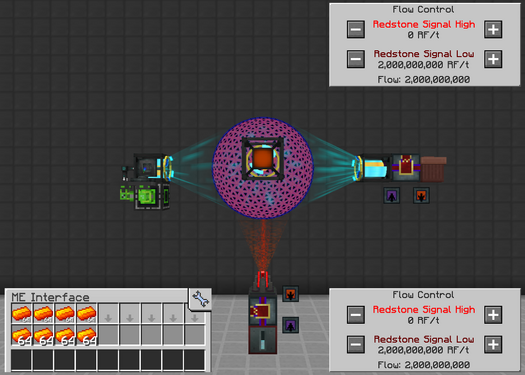
The core mechanic behind this approach is using flux gates to insert and extract as much RF/t as possible to keep the field strength above 0% while keeping the energy saturation level near 0%. No comparator or custom script is required. All that is needed is two flux gates, a chaotic capacitor bank, an energy trash can, and a lot of awakened draconium. This approach is simple, compact, and extremely easy to set up. The only downside is that it cannot automatically shutdown the reactor if the fuel conversion level reaches dangerous levels. Expect to convert 1,458 awakened draconium into 1 chaos shard every 5 seconds without any world accelerators.
| STEP 1 | |
| Insert awakened draconium with upgraded item translocators, or something else incredibly fast. Extract chaos shards with an item conduit.
Underneath the energy injector, place a flux gate and chaotic capacitor bank. Set the low redstone signal to insert 2B RF/t, or higher. The chaotic capacitor bank is technically capped at 500k RF/t, but the flux gate is able to extract more than that with no upper limit. Next to one of the stabilizers, place a flux gate and energy trash can. Set the low redstone signal to extract 2B RF/t, or higher. This keeps the reactor fueled, the containment field charged, and the energy saturation as low as possible. Hold CTRL+SHIFT while scrolling in the flux gates to raise the incremental change, and verify their orientations (purple IN, orange OUT). Disable the reactor at any time through the GUI. |
|
Optional: OpenComputers
The flux gate method works perfectly fine without any more additions, but it does NOT automatically shutdown the reactor if it ever runs out of fuel. Fortunately, an OpenComputers script can be added to mitigate that risk.
| STEP 1 | |
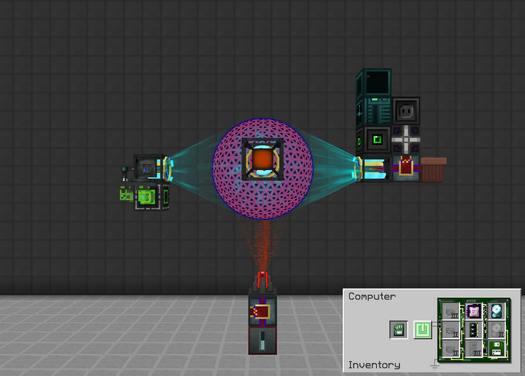
| Place a screen (Tier 3), computer case (Tier 3), keyboard, adapter, power converter, and neutronium energy cell as shown. The keyboard is on top of the power converter.
Insert the bare minimum components into the computer case. These could be even lower tier but there is no reason not to use the best components.
After booting up, follow the commands on screen to install OpenOS.
|
|
| STEP 2 | |
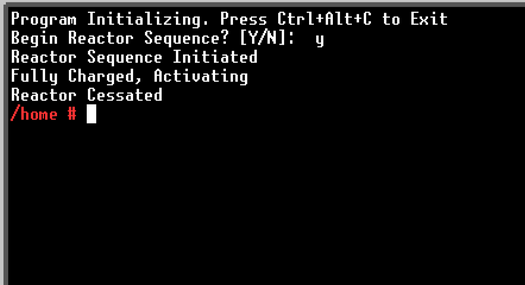
Create a new script by typing edit reactor.lua. The name is not important. Copy the code below into the script. Use middle-click to paste.
Press CTRL+S to save and CTRL+W to exit. Use the same edit command to change the code at anytime. Launch the script by typing |
|
-- Credits: UltraProdigy, Fox
local component = require('component')
local term = require('term')
local sides = require('sides')
local thread = require('thread')
local reactor = component.draconic_reactor

-- Shared Variables
local temperature = 0
local fuelConversion = 0
local maxFuelConversion = 0
local fuelConversionLevel = 0
local fieldStrength = 0
local maxFieldStrength = 0
local fieldStrengthLevel = 0
local energySaturation = 0
local maxEnergySaturation = 0
local energySaturationLevel = 0
local dataThreadStopper = false

-- Data Output Thread
thread.create(function()
while not dataThreadStopper do
    local data = reactor.getReactorInfo()
    if data then
        temperature = data.temperature
        fuelConversion = data.fuelConversion
        maxFuelConversion = data.maxFuelConversion
        fuelConversionLevel = (fuelConversion / maxFuelConversion)
        fieldStrength = data.fieldStrength
        maxFieldStrength = data.maxFieldStrength
        fieldStrengthLevel = (fieldStrength / maxFieldStrength)
        energySaturation = data.energySaturation
        maxEnergySaturation = data.maxEnergySaturation
        energySaturationLevel = (energySaturation / maxEnergySaturation)
    end
    os.sleep(0.1)
end
end)

-- Function to Prompt the User
local function ask(prompt)
    io.write(prompt.. " ")
    return io.read()
end

-- Function to Initiate / Charge the Reactor
local function reactorInitiation()
    while true do
        term.clear()
        print('Program Initializing. Press Ctrl+Alt+C to Exit')
        local reactorStart = ask('Begin Reactor Sequence? [Y/N]: ')
        if reactorStart == 'Y' or reactorStart == 'y' or reactorStart == 'yes' or reactorStart == 'Yes' then
            reactor.chargeReactor()
            return
        else
            os.sleep(0.5)
        end
    end
end

-- Function to Wait for 2000C to Activate Reactor
local function waitForActivation()
    while true do
        if temperature >= 2000 and fieldStrengthLevel >= 0.49 and energySaturationLevel >= 0.49 then
            reactor.activateReactor()
            return
        else
            os.sleep(0.5)
        end
    end
end

-- Function For Reactor and Shutdown Threads
local function reactorShutdown()
    local shutdown = false
    local outputOn = false

    -- Emergency Shutdown Thread
    local emergencyShutdownThread = thread.create(function()
        while not dataThreadStopper do
            if fuelConversionLevel >= 0.20 or fieldStrengthLevel < 0.20 then
                shutdown = true
                break
            end
            os.sleep(0.5)
        end
    end)

    -- Offline Reactor Thread Killer Thread
    thread.create(function()
    while not dataThreadStopper do
        local data = reactor.getReactorInfo()
        local status = data.status
        if status == 'offline' or status == 'stopping' then
            shutdown = true
        end
        os.sleep(0.5)
    end
    end)

    -- Flag Finder
    while not shutdown do
        os.sleep(0.1)
    end

    reactor.stopReactor()
    dataThreadStopper = true
end

-- Main Line
reactorInitiation()
print('Reactor Sequence Initiated')
waitForActivation()
print('Fully Charged, Activating')
reactorShutdown()
print('Reactor Cessated')
os.exit()
Trivia
- The reactor core can be World Accelerated to further increase the fuel conversion rate. However, the 2x, 4x, and 8x speeds require a very significant amount of RF/t to sustain the reactor and anything above that causes it to explode immediately.