GT New Horizons · Extreme Voltage (EV)
Dissolution Tank
The Dissolution Tank is an EV tier multiblock for diluting rare earth solutions with water or acid at very specific ratios. The Dissolution Tank is used exclusively in the Monazite Line, Bastnasite Line, and Prismarine Lines, and often follows a Digester which breaks down raw ore into rare earth solutions. The ratio between input fluids, as shown in NEI, must be followed exactly or else the machine shuts down and voids the current recipe. Recipes can and should be multiplied for batch crafting because the exact amount does not matter, only the ratio.
Construction
The Dissolution Tank has no tiered components. The glass can be any tier and has no effect on the operation of the machine. Buses/hatches may replace any stainless steel machine casing anywhere on the structure. Multi-amp and laser energy hatches are not supported, but there can be multiple regular energy hatches for overclocking. The interior of the structure is entirely mandatory air so nothing can be inside the machine. Use the Multiblock Structure Hologram Projector to visualize/build the structure with subchannel "glass" to specify the tier of the glass.
Structure
- Controller: Front center, 2nd layer
- 30-44 Clean Stainless Steel Machine Casing
- 24 Any Tiered Glass
- 9 Heat Proof Machine Casing
- 1+ Energy Hatch: Any stainless steel casing
- 1 Maintenance Hatch: Any stainless steel casing
- 1+ Input Bus/Hatch: Any stainless steel casing
- 1+ Output Bus/Hatch: Any stainless steel casing
Wallsharing
Dissolution Tanks may wallshare each of their sides to save on casings, glass, and buses/hatches. However, the machine is used exclusively in processing lines so it may not be very useful or practical to share anyway.
Usage
The Dissolution Tank requires very specific input fluid ratios in order to run. Otherwise, the machine shuts down and voids the current recipe. The margin of error is less than 0.1% or 10L per 10,000L so be very precise and accurate when using the machine. The following table lists all the important Dissolution Tank recipes and their required ratios with any programmed circuit values in parentheses. These are also available in-game through NEI. The ratios do NOT apply to any solid ingredients (ie. saltpeter) so the input bus can remain fully stocked.
| Solute (Programmed Circuit) | Amount | Solvent | Amount | Ratio | Output | |
| Muddy Monazite Rare Earth Solution (1) | 1,000 L | Water | 10,000 L | 10:1 | 11,000 L | |
| Muddy Monazite Rare Earth Solution (9) | 9,000 L | Water | 90,000 L | 10:1 | 99,000 L | |
| Muddy Samarium Rare Earth Solution (1) | 1,000 L | Nitric Acid | 1,000 L | 1:1 | 2,000 L | |
| Muddy Samarium Rare Earth Solution (9) | 9,000 L | Nitric Acid | 9,000 L | 1:1 | 18,000 L | |
| Samarium Rare Earth Mud (1) | 1,000 L | Water | 9,000 L | 9:1 | 10,000 L | |
| Samarium Rare Earth Mud (9) | 9,000 L | Water | 81,000 L | 9:1 | 90,000 L | |
| Conditioned Bastnasite Mud | 1,000 L | Water | 10,000 L | 10:1 | 11,000 L | |
| Industrial Strength Hydrofluoric Acid | 4,000 L | Hydrogen Peroxide | 4,000 L | 1:1 | 8,000 L | |
| Prismarine-Contaminated Hydrogen Peroxide | 6,000 L | Hydrogen Peroxide | 2,000 L | 3:1 | 8,000 L |
These ratios can and should be multiplied for batch crafting because the exact amount does not matter, only the ratio. For example, it is perfectly acceptable to insert 2,000L of monazite solution and 20,000L of water because that maintains the required 10:1 ratio for that recipe. Only one batch is processed at a time because the Dissolution Tank only has one parallel, but it runs perfectly fine. The fluid amounts also do not have to be an exact multiple of the recipe, such as 1,600L of muddy monazite solution and 16,000L of water. The underlying code simply divides the larger fluid amount by the ratio and compares the result to the smaller fluid amount to verify that the requirement is met regardless of how much fluid is actually available.
Automation
The challenge in using the Dissolution Tank effectively is consistently providing a perfect ratio of solute to solvent. Otherwise, the machine shuts down and voids the current recipe.
 Important: | Some of the numbers here may vary depending on the recipe. Those shown here are for Muddy Monazite Rare Earth Solution (9) specifically. |
Method 1: GregTech
The core mechanic behind this approach is using GregTech fluid regulators to output very specific amounts of fluid on a regular interval. They are also easily toggleable with a machine controller cover. This approach is simple, compact, and easy to setup. The only downside is that it does not scale very well. The entire setup must be rebuilt for each Dissolution Tank even when running the same recipe for the same processing line, but one is usually enough anyway.
| STEP 1 | |
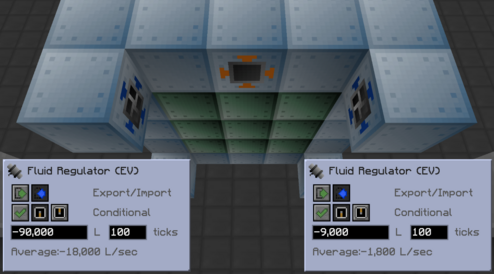
| Place two input hatches and an input bus as shown in the image to the right. The input hatches must be large enough to hold at least a recipe's worth of fluid.
Place an EV+ fluid regulator on the side of both input hatches. Adjust their settings to import one (or more) recipe's worth of fluid every 100 ticks. Change their control behavior to USE MACHINE PROCESSING STATE for disabling them with a machine controller cover. |
|
| STEP 2 | |
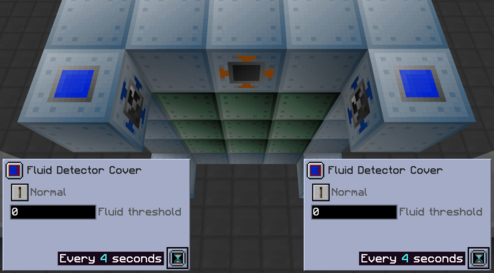
| Place a fluid detector cover on the side of both input hatches. Keep the default settings, but set the tick rate to 4 seconds for both.
These output a redstone signal when there is fluid inside the input hatches, disabling the fluid regulators. |
|
| STEP 3 | |
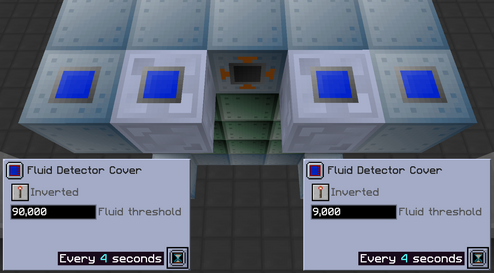
| Place a fluid tank in front of both fluid regulators. The tanks must be large enough to hold at least a recipe worth's of fluid.
Place a fluid detector cover with INVERTED redstone behavior on the side of these tanks. Set the fluid threshold to one (or more) recipe's worth of fluid and the tick rate to 4 seconds. These output a redstone signal when the tanks do NOT have enough fluid for a single recipe, disabling the fluid regulators. |
|
| STEP 4 | |
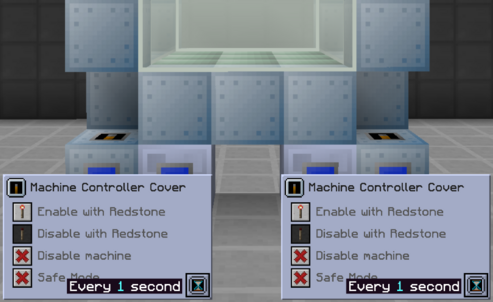
| Place a machine controller cover on the top of both input hatches. Adjust their settings to DISABLE WITH REDSTONE and set the tick rate to 1 second for both.
These disable the fluid regulators when they receive a redstone signal from either of the fluid detector covers. |
|
| STEP 5 | |
| Place red alloy wires on the side of the fluid detector covers and leading up to the machine controller covers.
Supply the necessary ingredients in any manner. The example to the right uses a dual interface filtered to the two fluids and saltpeter. Conduits push the ingredients to the tanks and input bus. A reservoir hatch can replace one of the fluid tanks (NOT THE INPUT HATCH) for recipes with water as a solvent. |
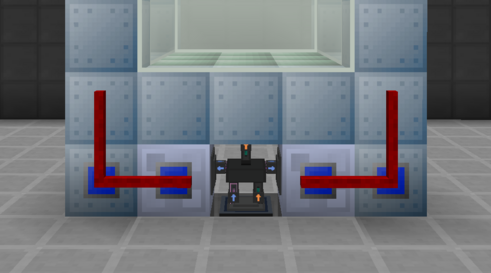
|
Method 2: Applied Energistics
The core mechanic behind this approach is using a level maintainer to automatically make crafting requests with exact amounts of fluid. Blocking mode prevents over-inserting fluids. This approach is compact and scales well since the same setup can easily extend to multiple Dissolution Tanks. The downside is that it requires some basic knowledge of subnetting and idle power consumption is higher.
| STEP 1 | |
| Place all the necessary buses and hatches on the Dissolution Tank as shown in the image to the right.
From left to right: ME stocking input bus, ME output bus, ME output hatch, input hatch, input hatch. The two input hatches must be large enough to hold at least a recipe's worth of fluids. Filter the stocking input bus to any solid input ingredients (saltpeter). |
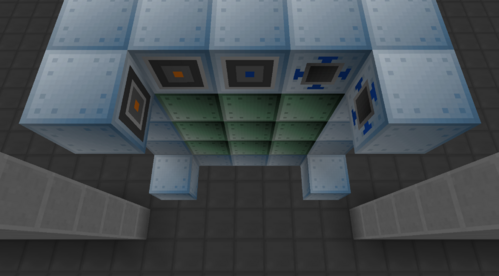
|
| STEP 2 | |
| Place a full-block ME dual interface over the two input hatches and enable BLOCKING MODE.
Place an ME dual interface on the main network (green) facing directly into a fluid storage bus on the Dissolution Tank subnetwork (blue). Set the fluid storage bus to INSERT ONLY and filtered to the output fluid. This sends the output fluid to the main network but through the subnetwork first--to complete crafting requests. |
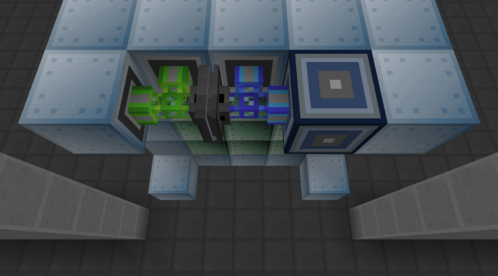
|
| STEP 3 | |
| Build out the Dissolution Tank subnetwork (blue). At a minimum, there needs to be an ME controller, level maintainer, fluid discretizer, and a crafting storage.
This allows the Dissolution Tank subnetwork to make its own automatic crafting requests with fluids. Power the subnetwork with a quartz fiber cable connecting to the main network (green). |
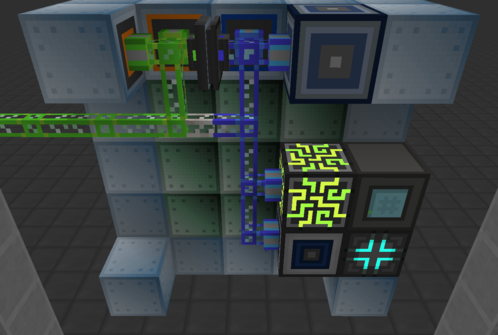
|
| STEP 4 | |
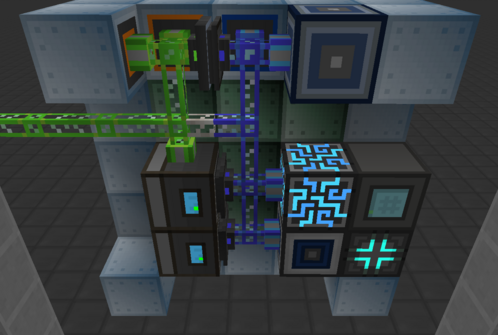
| The fluid ingredients can be supplied to the subnetwork in a variety of different ways.
Here, there are two ME chests on the main network (green) with fluid cells partitioned to the necessary fluids, such as Muddy Monazite Rare Earth Solution. The priority on these chests are then raised significantly so the main network prioritizes filling them first. A sticky card on the fluid storage cells also works. The Dissolution Tank then reads the fluids inside the ME chests with fluid storage buses set to EXTRACT ONLY. |
|
| STEP 5 | |
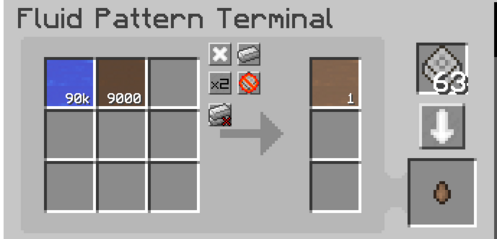
| Create a pattern involving ONLY the fluids from the recipe. In this example, 90k water and 9k Muddy Monazite Rare Earth Solution makes 1 Diluted Monazite Rare Earth Mud.
Multiply this pattern if there is enough room in the input hatches and the Dissolution Tank is processing recipes faster than the subnetwork can make automatic crafting requests. |
|
| STEP 6 | |
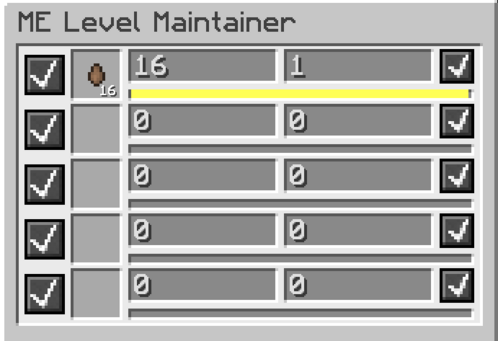
| Lastly, create the automatic crafting request for the output fluid in the ME level maintainer. A drop MUST be used instead of the fluid itself.
The amount is set to 16 to support up to 16 Dissolution Tanks running the same recipe at once, although only one is really necessary. The batch size can just stay at 1 regardless. Scaling this approach is as simple as adding more full-block ME dual interfaces and more crafting storages to the Dissolution Tank subnetwork. |
|
Method 3: Steve's Factory Manager
The core mechanic behind this approach is using a Steve's Factory Manager script to specify exactly how much fluid should be pushed to the input hatch(es) at a time. This approach is simple, compact, and scales well. The same setup can easily extend to multiple Dissolution Tanks, but that would require some modification of the script and therefore some basic knowledge of SFM in general.
| STEP 1 | |
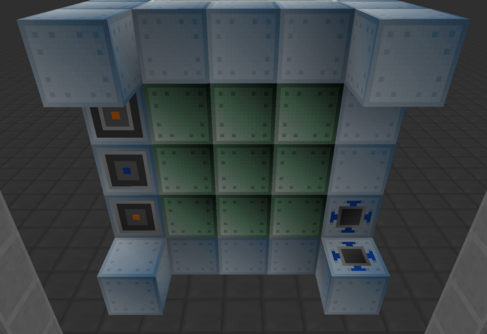
| Place all the necessary buses and hatches on the Dissolution Tank as shown in the image to the right.
The left side has an ME stocking input bus, ME output hatch, and ME output bus. The right side has two input hatches that are large enough to hold at least a recipe's worth of fluids. Filter the stocking input bus to any solid input ingredients (saltpeter). |
|
| STEP 2 | |
| Place a Machine Inventory Manager (MIM) in front of the two input hatches. Place a fluid reservoir and a fluid tank on the other sides of the MIM. The locations are not important, but keeping everything close eliminates the need for inventory cables.
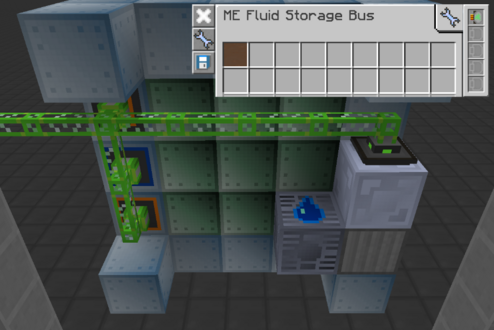
There are a few different methods for storing the solvent in the fluid tank. This example uses a filtered fluid storage bus set to INSERT ONLY with a sticky card. Connect the ME buses/hatches and the fluid storage bus to the main AE2 network (green). |
|
| STEP 3 | |
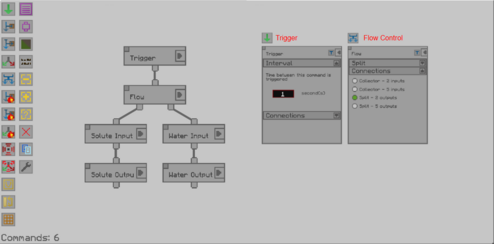
| The remaining steps are all done within the MIM. The image to the right is the complete and finished program. Use it as a reference for the commands defined on the right and in the next step. Click to enlarge any of the images.
The program itself executes every second. If the necessary resources are not available then the Dissolution Tank does not start. If a setting/page of a command is not shown, assume that it is left to the default settings. |
|
| STEP 4 | |
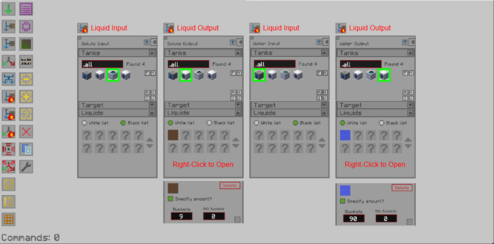
| Define the liquid input and output variables. Select the appropriate tanks and hatches. Ensure that the solute and water are not going to the same input hatch. Use their coordinates to tell the difference between them.
Right-click the fluid in the output filters to specify the target amount for each fluid. Recall that 1 bucket is the same as 1,000L. Nothing else is required after the command blocks are all connected. The MIM runs on its own without power. |
|