GT New Horizons · Stone Age
GT Tools
 | Needs Cleanup! Some of the information is confusing or incomplete. Please help improve this article if able. |
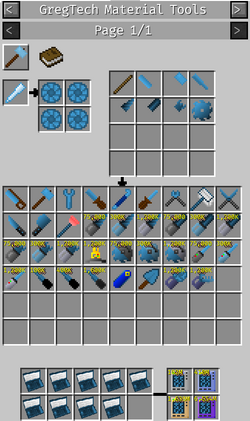
GregTech Tools are a class of items that can be crafted with any GregTech compatible material, each having different durability, speed and possibly secondary enchantment effects such as Fortune, Sharpness or Silk Touch. GT tools cannot be repaired by combining nor with the Thaumic Restorer. Some GT tools include batteries in their crafting recipes and will have both durability and require EU power charge, or have multiple modes that allow them to substitute for several simpler tools.
- If a tool or part is not listed here, then it is only used for crafting.
- There is a tutorial covering how to craft your first tools.
- This page covers GregTech tools only - you may be looking for Tinkers Tools instead.
Tools
Branch Cutter
- Left click
- Guarantees sapling drop from vanilla or Forestry trees, similar to a Grafter.
- Does not work on Silverwoods nor other modded trees.
- Fortune increases the odds of secondary drops, but only one item per leaf block is dropped.
- Silk Touch drops leaf blocks instead of saplings/standard drops, like Shears.
Butchery Knife
- Left click
- When used as a weapon, guarantees mobs and creatures do not explode when dealing the killing blow.
- Has some level of Looting for increased drops, dependent on material.
Crowbar
- Right click
- Removes covers from machines/blocks/pipes.
- Can repair a maintenance issue on multiblocks ("That doesn't belong there").
File
Only used for crafting
Hammer
- Left click
- Breaks placed ores into crushed ores.
- Breaks placed blocks into products of Forge Hammer recipes, such as glass into glass dust or brick blocks into bricks.
- Right click
- Toggles Auto-Input/Output on most GT blocks. Only really affects blocks with an item inventory that can accept/extract items.
- Prospects ores in a very small range
- Can repair a maintenance issue on multiblocks ("Platings are dented").
Hoe
- Right click
- Tills grass/dirt blocks near water source blocks.
- Turns grass into dirt and has a chance to find a vanilla, Natura, or Witchery seed.
- Doesn't do anything the Tinkers Construct mattock doesn't do.
Plow
- Left click
- Breaks a 3x3x3 area of snow.
Plunger
- Right click
- Voids 1,000L of fluid from a GT machine or block or pipe.
- Removes items stuck in item pipes
- Shift right click
- Voids ALL fluid from a GT machine or block or pipe.
Saw
- Left click
- Harvests ice
Scoop
- Left click
- Breaks Forestry beehives to get bees.
Screwdriver
- Right click
- Increases the output stack size of item filters and buffer chests, when used on their output side.
- Toggles the Input Filter of most GT machines and hatches/buses that have an input slot.
- Allows input on the output side of GT machines, when used on their output side.
- Sets output restrictions on output hatches. Restricted output hatches have higher priority over non-restricted hatches.
- Increases the output amperage of Energy Buffers.
- On multiblock controllers, toggles input bus separation. Useful for separating programmable circuits into separate input buses.
- Toggles settings on covers such as pumps, conveyors, and robot arms. Better to use the GUI if it is available for the cover (shift-right click with an empty hand).
- Toggles voiding overflow mode on Super/Quantum Chests.
- Changes the work area of single-block and multi-block miners and pumps. May not actually do anything for multi-blocks.
- Toggles the working mode for World Accelerators.
- Displays the Radiation Shutter Control GUI on Radio Hatches.
- Shift right click
- Decreases the output size stack of item filters and buffer chests, when used on their output side.
- Toggles "Input allowed on output side" of most GT machines. Useful for placing ME Interfaces on machines so they can auto output back into the Interface when crafting is finished.
- Toggles settings on covers such as pumps, conveyors, and robot arms. Still better to use the GUI.
- Toggles the Input Filter of most single-block GT machines that have an input slot.
- Toggles Sorting and Limiting modes on input buses.
- Toggles the working radius for World Accelerators (does not work in TileEntity mode).
- Can repair a maintenance issue on multiblocks ("Screws are loose").
Soft Mallet
- Right click
- Enables/disables singleblock machines and multiblock controllers.
- Inverts the power conversion mode on transformers.
- Causes a deliberate recheck on the structure of Long Distance Pipelines (both item and fluid.)
- Can repair a maintenance issue on multiblocks ("Something is stuck").
Soldering Iron
Requires Electricity. Must be charged in order to work.
- Held
- Makes GT cables, wires, and pipes appear tiny so you can see around them.
- Causes decorative covers (plates, foils, AE2 facades) attached to pipes and wires to stop rendering visually, allowing you to see the wire or pipe underneath.
- Right click
- Toggles strong/weak redstone output on a GT machine side. A strong redstone signal will pierce through a block, allowing the signal to be picked up on the other side. Useful for putting howler alarms or lights adjacent to multiblock controllers.
- Toggles void excess mode on GT++ multis.
- Can repair a maintenance issue on multiblocks ("Circuitry burned out").
- Note: Each use consumes the first piece of soldering iron or tin material in your inventory. Use nuggets, fine wire, or bolts to use the least amount of material.
- Shift right click
- Toggles "Multi Stack Input": If a singleblock can accept multiple stacks of the same item. See also: Limiting mode on input buses with a screwdriver.
Wire Cutters
- Left click
- Safely breaks GT wires and cables.
- Right click
- Connects/disconnects cables and wires to each other and to machines.
- Toggles input separation on Alloy Blast Smelter
- Shift right click
- Enables batch mode
Wrench
- Left click
- Safely breaks most GT machines, blocks, and pipes (check WAILA to make sure).
- Safely breaks the AFSU and deletes all of its stored energy (don't do this; right-click instead to keep most of the energy).
- Shift left click
- Safely breaks most GT machines, blocks, and pipes (check WAILA to make sure) And removes any covers / spray paint from them.
- Right click
- Changes the output face of GT machines.
- Changes the input/output face of GT hatches/buses for the multiblocks.
- Connects and disconnects GT fluid and item pipes.
- Changes the speed for a World Accelerator.
- Safely breaks the AFSU when used on its output face and keeps 80% of its currently-stored energy.
- Shift right click
- Changes the rotation of GT machines.
- Toggles input blocking on a GT fluid pipe side. This is useful to make fluid only go in one direction, which increases pipe throughput and reduces lag.
- Shift-right-clicking the air toggles between "line mode" and normal mode. In line mode, actions will affect entire straight sections of pipes.
- Can repair a maintenance issue on multiblocks ("Pipe is loose").
Recommended Materials
The following table is a list of recommended materials that maximize durability and/or mining speed for GT Tools. These values are generally shared between all types of tools. One exception is the electric wrench which applies a multiplier depending on the voltage tier (up to 4x for HV). Another exception is the soft mallet which scales with completely different materials.
Note that the Vajra is unlocked in IV and is perfect for breaking blocks, machines, pipes, wires, etc. It has infinite durability, speed, and even a silk touch mode for higher precision. However, the Vajra cannot change the direction of pipes/wires, toggle multiblock settings, or repair maintenance issues; the standard GT tools are still needed for those tasks.
| Tier | Material | Durability | Mining Speed | Mining Level |
| S | Iron | 25,600 | 6.00 | 2 |
| Rock Salt | 41,500 | 3.73 | 2 | |
| Steel | 51,200 | 6.00 | 3 | |
| Shadow Metal[1] | 819,200 | 32.0 | 4 | |
| Thorium | 51,200 | 6.00 | 2 | |
| LV | Ardite | 102,400 | 18.0 | 4 |
| Damascus Steel | 128,000 | 8.00 | 3 | |
| Vanadium Steel | 192,000 | 3.00 | 3 | |
| Mana Steel | 512,000 | 8.00 | 4 | |
| HV | Manyullyn | 204,800 | 25.0 | 5 |
| Vibrant Alloy | 404,800 | 18.0 | 4 | |
| EV | Terrasteel | 1,024,000 | 32.0 | 5 |
| Elven Elementium | 3,276,800 | 20.0 | 7 | |
| IV | HSS-E | 1,024,000 | 32.0 | 7 |
| Oriharukon | 1,024,000 | 32.0 | 5 | |
| Orichalcum | 2,048,000 | 32.0 | 1 | |
| Ichorium | 85,000,000 | 32.0 | 12 | |
| LuV | Draconium | 3,276,800 | 20.0 | 7 |
| Duranium | 4,096,000 | 32.0 | 11 | |
| Trinium | 5,120,000 | 128 | 8 | |
| MAR-Ce-M200 Steel | 20,480,000 | 150 | 4 | |
| Gaia Spirit | 85,000,000 | 32.0 | 12 | |
| ZPM | Neutronium | 65,536,000 | 24.0 | 6 |
| Tritanium | 143,539,200 | 20.0 | 6 | |
| UHV | Infinity Catalyst | 131,072,000 | 64.0 | 10 |
| Infinity | 262,144,000 | 256 | 17 | |
| UIV | Transcendent Metal | 786,432,000 | 290 | 22 |
| Spacetime | 1,048,576,000 | 320 | 25 | |
| Creon / Mellion | 2,097,152,000 | 1.0 | 26 | |
| UXV | Magmatter | 16,777,216,000 | 1.0 | 26 |
- ↑ While technically possible as early as Stone Age, Shadow Metal is feasible as soon as Thaumcraft is unlocked with basic Crucible crafting in v.2.9+, as it no longer requires the Vacuum Freezer.