GT New Horizons · High Voltage (HV)
Vacuum Freezer
The Vacuum Freezer (VF) is an HV tier multiblock for cooling hot ingots and fluids. Most hot ingots come from an Electric Blast Furnace and can be routed directly to the VF because there is no other use for them. Cooling hot ingots generally requires a lower voltage tier than smelting dusts so it is easier to sustain and produces no pollution. The VF can also replenish coolant cells for a Vacuum Reactor and return plasmas back to their molten state. The VF is superseded by the Cryogenic Freezer in IV, or the Mega Vacuum Freezer.
Construction
The VF consists of a single type of casing and has no tiered components. Buses/hatches may replace any casing anywhere on the structure. Multi-amp and laser energy hatches are not supported, but there can be multiple regular energy hatches for overclocking. Use the Multiblock Structure Hologram Projector to visualize/build the structure.
Structure
- Controller: Front center, 2nd layer
- 16-21 Frost Proof Machine Casing
- 1+ Energy Hatch: Any casing
- 1 Maintenance Hatch: Any casing
- 1+ Input Bus/Hatch: Any casing
- 1+ Output Bus/Hatch: Any casing
Wallsharing
VFs may wallshare each of their sides to save on casings and buses/hatches. No recipe uses more than 1A of power so it is possible to share one energy hatch between two machines.
Usage
The VF offers no bonuses or parallels and runs standard, imperfect overclocks. As with any multiblock, be careful to not let it powerfail and void recipes. As a basic rule of thumb, upgrade the energy hatches on the VF at the same time as the Electric Blast Furnace (EBF) to match throughput. Cooling hot ingots generally requires a lower voltage tier than smelting dusts so it is easier to sustain and produces no pollution.
Routing Hot Ingots
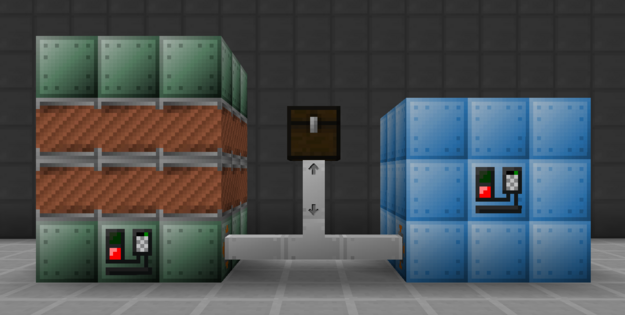
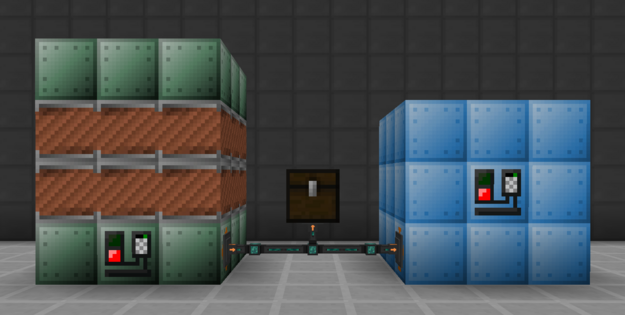
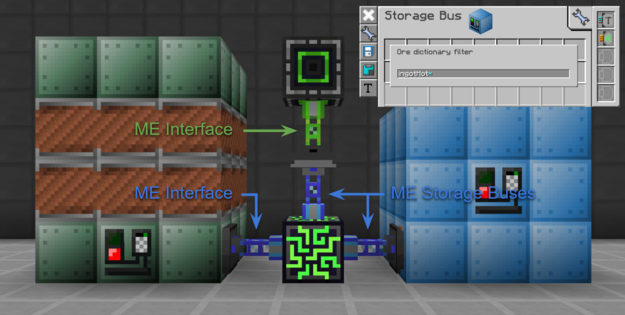
The EBF does not always produce hot ingots and therefore cannot route everything directly to the VF. There has to be some sort of filtering to separate hot ingots from the rest of the outputs. The easiest solution is right-clicking the input bus on the VF with a screwdriver to enable input filtering. This prevents any item that does not have a recipe in the VF from entering the input bus. The remaining items can be sent to a chest with a lower priority. Another option is to use a type filter set to hot ingots with a higher priority than any other inventory.
| Method 1: Item Pipes |
 |
|
| Method 2: Item Conduits |
 |
|
| Method 3: Applied Energistics 2 |
 |
|