GT New Horizons · Getting started
Development
Everyone can contribute to GTNH in one way or another. One possible way is to improve or expand the source code of the mods.
To get started, you first need a vision for what you want to do.
If you don't have it yet, you can look through issues and try to address some.
If you do have a vision but want to hear more opinions on it, you can discuss it in a new Github issue or in Discord. The appropriate sub-channels are #mod-dev and #github-disccusion.
Getting Started
Lost?
- Check out the GTNH Contribution Guide for Beginners and the Lexicon
Starting from an Existing Repository
If you want to modify an existing GTNH mod, first find the correct repository and fork it on GitHub.
If you are not sure which repository contains a particular item or block, identify the mod first, then look it up in this spreadsheet. If there is no GitHub link listed, GTNH may be using the upstream mod without GTNH-specific changes. In that case, ask in Discord #mod-dev.
Once you have the correct repository:
- Fork it on GitHub. When creating the fork, uncheck
Copy the master branch onlyso the fork includes version tags. The build process uses these tags to determine the mod version; without them, it falls back to the latest commit hash. Some mods have minimum version checks, which can then fail on Minecraft load. - Clone your fork locally. Consider cloning with
--filter=blob:none, especially for repositories with large histories such as GT5-Unofficial. This uses a partial clone: older file contents are not downloaded up front, and are fetched only on demand when you access them, which saves both disk space and clone time.
Starting from Scratch
This path is for you if you want to develop a new mod.
See the ExampleMod README.md if the instructions below don't work.
- Unzip project starter into project directory
- Replace placeholders in LICENSE-template and rename it to LICENSE, or remove LICENSE-template and put any other license you like on your code. This is an permissive OSS project and we encourage you participate in OSS movement by having permissive license like one in template. You can find out pros and cons of OSS software in this article
- Ensure your project is under VCS. For example initialize git repository by running
git init; git commit --message "initialized repository" - Replace placeholders (edit values in gradle.properties, change example package and class names, etc.)
- You are good to go!
Next Steps
- Import the project into your IDE. We recommend IntelliJ IDEA, which has a free Community Edition.
- In IntelliJ IDEA, you can simply open the project folder. In Eclipse, import it as an existing Gradle project.
- Run
./gradlew buildto build the project. - If the build fails, check the console output. Common causes include outdated dependencies or Spotless issues. You can usually fix them with
./gradlew updateDependenciesor./gradlew spotlessApplyrespectively.
If you are unsure how to implement something, look for similar code in GTNH repositories.
Testing in a Development Environment
Testing in a development environment is handy while you're still working on your changes, because it lets you quickly see the results and debug your code without spending most of your time loading mods you will not use during testing.
To get started, find the Run Client (Java 25, Hotswap) configuration in your IDE and run it. Running with debug and hotswap enabled is recommended, but not required. You also don't have to use Java 25: if you want to check whether your changes behave differently on Java 8, switch to the configuration without a Java version in its name.
Testing in the Full Pack
It is important to make sure your changes work in the full pack, especially if you changed something that may affect other mods.
- Build the project with
./gradlew build. - In
build/libs, find the jar without any suffixes other than-dirty. This suffix does not appear if you committed all your changes before building the jar. - Download the latest dev build and import it into the launcher of your choice. We recommend Prism Launcher.
- Replace the target mod with your built jar, or add it if it is a new mod.
- Launch the pack and verify that your changes work as expected.
Common Issues
- If your IDE reports missing stuff even after you run
./gradlew build, try deleting thebuildfolder and running./gradlew setupDecompWorkspace. - Most mods require at least Java 25 to run the latest Gradle. If you have multiple Java versions installed, you may need to set the
JAVA_HOMEenvironment variable to your desired Java installation and configure the same Java version in your IDE.
Git Configuration
If you want to avoid signing commits with your real name, then please refer to the page Managing Git Identities.
Contribution Procedure
- Find something to contribute.
- Fork the needed repos.
- Test your changes thoroughly. If you change something, understand the changed class or method in order to understand what to test.
- Push code into your fork.
- Open a pull request against master branch and provide a description on what it changes/adds/removes. Include pictures/graphs if necessary. If there is a related issue, link it.
- Address review problems. Resolve merge conflicts. Wait for the final merge. During this period, your PR might be merged into dev branch manually by project admins, on a case by case basis. If that happens, your changes will go into one of the dailies for border testing. There is no strict rules over whether this merge-into-dev will happen at all, and it's usually not needed anyway. It is expected that the original author fixes any issues that arise from their contributions.
Please do not make multiple changes/features in a single PR, make a separate PR for each. If they depend on each other, you can leave a note in the PR's description.
If you are not sure how to fork and open pull requests, read this gist by Chaser324.
GTNH-Specific Contribution Guides
- You can find the Code of Conduct of the GTNH dev community here.
- See which GTNH mods are supported outside of the modpack and see an overview of licenses in this spreadsheet.
- For the GTNH Code Style guidelines please see the dedicated page Code Style.
- For quest development, read the Quests Development Guide.
- The StructureLib documentation can be found here. Use this for your multiblock structures.
- To understand how chemical formulas are balanced in recipes, read Chemical Balance.
Tools
All applications that are grouped together can do about the same. This does not mean that you can pick any one of them, as they differ in functionality, style, performance and customizability. It is recommended you look at what they can do and try each one out, so you can decide which application you want to use for which use case.
| Category | Links |
|---|---|
| Code Editors | |
| Integrated Development Environments (IDEs) | |
| Image Editors | |
| Modeling | |
| Animation | |
| Miscellaneous |
Helpful IDEA Plugins
Additionally, if you choose JetBrains IntelliJ IDEA as your IDE, there are some plugins that can be very helpful in some ways
- Minecraft Development: Autocompletion for mixin development, builtin NBT editor, minecraft project project type in new project window, and a bunch more small utility. Notice that for GTNH specifically you will want the fork maintained by eigenraven. We use RFG as the build tool and that one unfortunately is not compatible with the original version available on the plugin marketplace. Follow the install instructions in README of that fork.
- ASM Bytecode Viewer: Very helpful plugin for asm development. Can also be occasionally helpful for mixin development. Notice that there are multiple plugins with similiar name and near identical purpose, with one of them being a bundled one from JetBrains. The JetBrains one is slightly wonky and doesn't display ASMified code. The plugin suggested here works perfectly and can display ASMified code. If in doubt whether you got the correct plugin, here is a direct link: https://plugins.jetbrains.com/plugin/10302-asm-bytecode-viewer. To use this plugin, focus on any opened Java editor tab (either it's decompiled library class without attached source, library class with attached source, or your own source files), then click ASM Bytecode Viewer in Code menu. The action is also available via Search Everything under the same name. For your own source files, it will trigger a project build to ensure .class files are up to date.
- Single Hotswap: Allows hotswapping just a single file when using the runClient task with Hotswap & Debug mode. IntelliJ's built-in feature "Compile and Reload" always reloads every single file that is referenced by the target class, which can take a while for bigger classes. This plugin gives better control what exactly you want to hotswap, decreasing hotswap times by a factor of 50[1]. Notice that you will need to disable the "Use Built-In Compiler" feature in the settings under "File > Settings > Build, Execution, Deployment > Debugger > Single Hotswap". To use this plugin, while running in debug mode with hotswapping enabled, open the class you want to swap and click the Hammer icon in the top right (next to the Pause, Restart, and Stop icons).
Debugging with Eclipse
Set up launch config:
- Select the project you want to debug
- Click the drop-down menu next to the debug symbol -> Debug configurations...
- Select "Remote Java Application"
- Click "New launch configuration" (top left)
- Change the port to 5005
- Click "Apply"
Actually debug:
- Launch the game with
--debug-jvm(I do this from the terminal) - Wait until it says "Listening for transport dt_socket at address: 5005"
- Debug with the launch config you created (you may have to go into the debug configurations menu again, if it doesnt show up in the drop-down yet)
- Change to the "Debug" view (button in the top-right corner). There may be a window popping up asking if you want to go there
- Done!
Maven/Jenkins Selection
| URL | Mods |
|---|---|
| https://aidancbrady.com/mekanism/download/ | Mekanism, MekanismGenerators, MekanismTools |
| https://api.modrinth.com/maven | All Modrinth mods |
| https://chickenbones.net/maven/ | CodeChickenCore, CodeChickenLib, EnderStorage, NotEnoughItems, Translocator, WR-CBE, ... |
| https://ci.rs485.network/ | |
| http://downloads.gtnewhorizons.com/Mods_for_Jenkins/ | Various |
| https://dvs1.progwml6.com/files/maven | IguanaTinkerTweaks, HungerOverhaul, Mantle, Natura, TinkersConstruct, TinkersMechworks, ... |
| https://files.projectredwiki.com/maven | MrTJPCore, ForgeRelocation, ProjectRed |
| https://files.vexatos.com | Are We Endgame Yet?, AsieLib, BeeSpecific, BuildcraftOilTweak, CheatyComputers, Computronics, Conventional, CustomManualTab, Don't Stub Your Toe, FactumOpus, ForecatsersBackpacks, TGregworks, ... |
| https://gregtech.overminddl1.com/ | Various |
| https://immibis.com/ | Advanced Machines, Advanced Repulsion Systems, AutoFood, Cloud Storage, Connected Glass, Dimensional Anchors, Immibis Core, Immibis's Macroblocks, Immibis's Microblocks, Immibis's Peripherals, InfiView, InfiniTubes, Liquid XP, RedLogic, Simple Recycling, TinyCarts, TubeStuff, ... |
| https://jenkins.bdew.net/maven | AE2Stuff, BDLib, CoFHLib, Compacter, Computercraft, Generators, Gendustry, Mekanism, Pressure, ... |
| https://jenkins.dries007.net/ | AutoCrafter2000, BetterFoliage, CrayCrafting, D3Backend, D3Log, GooglyEyes, GreenThumb, HoloInventory, InsiderTrading, MCLink, MineSafety, MorphAdditions, Pay2Spawn, Pay2SpawnBlocks, PlaceableTools, TapeMouse, TerraFirmaCraft, TerraFirmaStuff, TFCraft-NEIplugin, TFC-Tweaks, Thermal Expansion, TorchTools, WeepingAngels, ... |
| https://jenkins.ironhide.de/ | CraftingUtilities, Open Modular Turrets, FloodLights, ... |
| http://jenkins.usrv.eu:8080/ | Various |
| https://nexus.gtnewhorizons.com/repository/public/ | Various |
| https://jitpack.io/ | Any GitHub project |
| https://maven.blamejared.com/ | MineTweaker3, CraftTweaker, ... |
| https://maven.cil.li/ | AppliedEnergistics 2, BetterStorage, BloodMagic, BluePower, BuildCraft, Charset, CodeChickenCore, CodeChickenLib, CoFHCore, CoFHLib, ColoredLightsCore, ComputerCraft, CraftGuide, EnderCore, EnderIO, EnderStorage, Forestry, Forge Multipart, GalacticraftCore, GregTech, Immibis Multipart, InGameWiki, Inventory Tweaks, Mantle, Mekanism, MineFactory Reloaded, MrTJPCore, NotEnoughItems, NotEnoughKeys, OpenComputers, PowerAdvantage, QmunityLib, ProjectRed, Railcraft, RedLogic, RedstoneFlux API, RotaryCraft, RotateableBlocks, ThaumicEnergistics, TinkersConstruct, TinkersMechworks, TIS-3D, Waila, WR-CBE, ... |
| https://maven.covers1624.net/ | ChickenChunks, CodeChickenCore, CodeChickenLib, EnderStorage, ForgeMultipart, NotEnoughItems, Translocators, WR-CBE |
| https://maven.falsepattern.com/releases | LightningOverhaul, AnimFix, CrashGuard, DyamicRendering, EndlessIDs, FalsePatternLib, JarLoader, LagGoggles, SSMLegacy, Triangulator, ... |
| https://maven.ic2.player.to/ | IndustrialCraft, Forestry, ... |
| https://maven.k-4u.nl/ | Boilerplate, InGameWiki, K4Lib, MoarCarts, PneumaticCraft, ServerInfoProvider, Steamcraft2, ... |
| https://maven.latmod.com/ | |
| https://maven.mcmoddev.com
Backup: https://maven.tophatcat.dev/ |
Baubles, LLibrary, Thaumcraft, VeinMiner, ... |
| https://maven.minecraftforge.net/
Backup: https://repo.spongepowered.org/repository/forge-proxy/ |
Biomes O' Plenty, HelpFixer, MalisisCore, MalisisDoors, Mixin, IronChest, ... |
| https://maven.modmuss50.me/ | |
| https://maven.mjrlegends.com/ | ExtraPlanets, ... |
| https://ci.tterrag.com/ | Chisel, CTMLib, CustomThings, DifficultyRecipes, EnderIO, EnderCore, EnderZoo, Ex-Astris, Ex-Nihilo, RecipeTweakingCore, SuperMassiveTech, ttCore, ... |
| http://mc.lunatri.us/files/ | Config Patcher, DynIMC, Extension Fixer, InGame Info XML, InGame Mod Configs, Laser, Level, LunatriusCore, Monster Spawner Highlighter, Profiles, Schematica, SchematicaPlugin, Stackie, Tracer |
| https://minecraft.curseforge.com/api/maven/ | Any CurseForge file |
| http://minetweaker3.powerofbytes.com/download/ | MineTweaker3 |
| https://mobiusstrip.eu/maven | AdminCommandsToolbox, JABBA, MobiusCore, Netty-Opis, Opis, WAILA, ... |
| https://modmaven.dev/ | AccountSync, AddictedToRed, AI Improvements, Announcement Mod, Armory, Armory Gem Items, AssemblyLine, Atomic Science, Bagable Plants, Basic Industry, boilerplate, BoneTorch, cardboardboxes, ChickenChunks, CodeChickenCore, CodeChickenLib, Colored Chests, Colored Pots, Come Closer, Controlling, Corruption, Ender Storage, Forge Multipart, GasCan, GrapplingHook, HelmBucket, ICBM, ICBM Classic, ICBM Classic Sentry, IguanaTinkerTweaks, IguanaTweaks, Magic Mirror, MC Profiler, MFFS, MilitaryBaseDecour, MinecraftJUnit, moarcarts, NotEnoughItems, NVFix, ProgressWorldCleanup, RedCow, Sentry AA, SkyIslandGenerator, steamcraft2, Translocator, VE Fluid Handling, Voltz Engine, Voltz Engine Essentials, Wooden Bucket, Wooden Rails, Wooden Shears, WR-CBE, ... |
| https://mvn.falsepattern.com/releases | GasStation, LightingOverhaul, MixinExtras, AnimFix, CartLoad, CrashGuard, DynamicRendering, EndlessIDs, FalsePatternLib, FalseTweaks, JarLoader, LagGogglesLegacy, SSMLegacy, Triangulator, GalactiCraft-Core, GalactiCraft-Planets, MicdoodleCore, Biome Wand, Space Core, CoroUtil, EnhancedBiomes, Tropicraft, ... |
| https://purpleposeidon.github.io/fz_archive/ | Factorization |
| https://repo.spongepowered.org/maven/ | Mixin, ... |
| https://www.cursemaven.com | Any CurseForge file |
| https://www.mod-buildcraft.com/releases/BuildCraft/ | Buildcraft, BuildCraft Compat |
| https://www.ryanliptak.com/maven/ | AppleCore |
Resources
Not every wiki/tutorial/article/... listed here contains information about Minecraft version 1.7.10 but some topics haven't changed much and often the general methodology is the same. The newer the version, the less comparable the inner workings of Minecraft/Forge are to 1.7.10.
Use Ctrl+F if you look for something specific.
You can look at the source-code of most mods included in GTNH here.
Link Collections
| Name | Version(s) |
|---|---|
| MMD Resource Index | Various |
| Minecraft Modding Overview (WIP) Resources for Mr. Turner (Archive) | 1.6, 1.7 |
| Awesome Minecraft 1.7.10 | 1.7.10 |
Tutorials / Blogs
| Name | Version(s) | Topics (including, but often not limited to) |
|---|---|---|
| MMD Modding-Resources | Various | Blocks, Commands, Entities, Fluids, Items, Rendering, ... |
| Jabelar's Minecraft Forge Modding Tutorials | Various | Getting Started, Concepts, Registries, Entities, Blocks, Items, Armor, Weapons, Tools, Fluids, Tanks, Recipes, Ore Dictionary, Loot, Tile Entities, Networking, Events, Models, Animations, Rendering, Assets, Enchantments, GUIs, Keybindings & Mouse, Achievements / Advancements, Configs, World Generation, Creative Tabs, Particles, Sounds, Commands, IMC / Compat, ... |
| #knowledgebase (Minecraft Pack Development Discord) | Various | Various bits of information on Mod(pack) Development |
| #resources (Blockbench Discord) | All | Modeling, Textures, Animation |
| 2xsaiko's Mixin Cheatsheet | All | Cheatsheet for mixins |
| TelepathicGrunt's How to Mixin | All | Mixins |
| timetravelbeard's How to Make Shaders | All | Shaderpacks |
| Mapping and Modding Tutorials on Minecraft Forum | All? | Various Topics |
| Old Forge Wiki Tutorials (Archive) | 1.3 - 1.7 | Gettings Started, Concepts, Blocks, Items, Recipes, Events, Ore Generation, Tile Entities, Commands, Rendering, Configs, Models, Biome Dictionary, Ore Dictionary, Achievements, Sounds, GUIs, Networking, NBT, Containers, Entities, Multiblocks, Fluids, Scala, ... |
| Wuppy's Tutorials (Archive) | 1.3 - 1.8 | Gettings Started, Recipes, Loot, Assets, Blocks, Items, Tools, Rendering, World Generation, Crops, Entities, Dimensions, ... |
| Vswe's Summer Courses (Archive) | 1.6.2 | Java Basics, Getting Started, Items, Blocks, Tile Entities, Entities, World Gen, Sounds, Particles, Models, Textures, Animations |
| The Grey Ghost's Minecraft By Example [Blog|GitHub] | 1.6 - 1.16 | Concepts, Blocks, Items, Rendering, User Input, Packets, Entities, GUIs, Containers, Tools, Redstone, ... |
| EMX Tutorials | 1.7 | Getting Started, Items, Blocks, Recipes, Keybindings, Textures, Drops, GUIs, NBT, Models, Containers, ... |
| coolAlias' Forge Tutorials | 1.7 | Armor, Villager Trades, Inventories, Events, Rendering, ... |
| Using the Simple Network Implementation (SimpleNetworkWrapper) [Tutorial (Archive)|Example] | 1.7 | Networking |
| Vike's ASM Tutorial [Part 1|Part 2] | 1.7 | ASM |
| Bedrock Miner's Tutorials (Archive) | 1.7, 1.8 | Getting started, Concepts, Blocks, Items, Tools, Armor, Food, Recipes, ... |
| TheXFactor117's Forge Modding Tutorials | 1.7, 1.8 | Getting Started, Items, Blocks, Armor, Tools, Ore Generation, NBT, Tile Entities, Assets, Creative Tabs, Recipes, Entities, ... |
| Darkhax' Tutorials | 1.8 - 1.12 | Custom Entity Data, Loot Tables, Events, Structure Generation, Update Checker, IMC, Jar Signing, Access Transformers, Rendering, CraftTweaker Support, Mixin |
| McJty's Tutorials | 1.9+ | Getting Started, Concepts, Configs, Blocks, Items, Tile Entities, Recipes, GUIs, Inventories, Entities, Rendering, Networking, Commands, Dimensions, WAILA Integration, ... |
| ShadowFacts' Tutorials | 1.10 - 1.12 | Getting Started, Concepts, Items, Models, Blocks, Blockstates, Assets, Crops, Creative Tabs, Recipes, Ore Dictionary, Food, Tools, Armor, World Generation, Tile Entities, Inventories, GUIs, Rendering, ... |
| suppergerrie2's Tutorials | 1.12 - 1.15 | Getting Started, Items, Blocks, Recipes, Ore Generation, Food, Creative Tabs, Tools, Slabs, Enchantments, Crops, Block States, Events, ... |
| Cubic Interpolation - Helpful Things for Making Mods with Forge for Minecraft 1.15 | 1.15 | Events, Registries, Tile Entities, Dimensions, Loot, Data Generators, Configs, NBT, ... |
| Forge Community Wiki | LTS, Latest | Getting Started, Concepts, Blocks, Items, Tile Entities, Events, Resources, Data, Models, Networking, Potions, Particles, Sound, Events, Loot, Key Bindings, Access Transformers, ... |
| Java Docs Tutorials | Not Minecraft specific | Java |
| Red Blob Games | Not Minecraft specific | Path Finding, Graph Theory, Map Generation, Procedural Generation |
| 0 FPS | Not Minecraft specific | Collision Detection, Geometry, Mathematics, Voxels, Shape Modeling, Ambient Occlusion, ... |
| Java introduction to MethodHandles - a faster reflection API replacement | Not Minecraft specific | Java, Reflection |
| Fabric Mixin Examples | Not Minecraft specific | Mixing into a private inner class, injecting into the head of a static block or method, injecting into the tail of a method, etc. |
Wikis / Docs
| Name | Topics |
|---|---|
| CraftTweaker Docs | CraftTweaker |
| Gradle User Manual | Gradle |
| Minecraft Forge Event List | Vanilla and Forge Events (MC 1.12+) |
| Fabric Wiki - Introduction to Mixins | Mixins |
| FTB Wiki Unofficial | Information on many Mods |
| Git Docs | Git |
| Data Driven Shaders by Ladysnake | MC 1.7+ Post Process Shaders |
| Mixin Extras Wiki | Mixin Extras |
| Mixin Wiki | Mixins |
| Official Forge Docs [Latest|Legacy] | Forge |
| Legacy Modding Wiki | Wiki for Modding on older Minecraft Versions (WIP) |
| 3 Wiki (Archive) | MineTweaker 3 |
| VisualVM Docs | VisualVM |
| wiki.vg | Protocols, Authentification, NBT, etc. |
| Wikipedia | More than you can think of (but not everything) |
Javadoc Viewers
| Name | Versions | Modloaders | Mappings |
|---|---|---|---|
| DocsMC | 1.7.10 | Forge | MCP |
| MCJavaDocs | 1.7.10 | Forge | MCP |
| ForgeJavaDocs (skmedix) | 1.7.10 - 1.12.2 | Forge | MCP |
| ForgeJavaDocs-NG | 1.12.2+ | Forge, NeoForge | MCP, Mojang |
| Lexxie's Minecraft JavaDocs | 1.16.5+ | Fabric, Forge, NeoForge | MCP, Mojang |
| ForgeJavaDocs (MCStreetguy) | 1.19.4+ | Forge | Mojang |
Mapping Viewers
| Name | Versions | Mappings |
|---|---|---|
| Minecraft Mapping Viewer | 1.0+ | Calamus, Feather, Intermediary, Legacy Intermediary, Legacy Yarn, MCP, Mojang, Notch, Parchment, RetroMCP, SRG, Yarn |
| Minecraft Names | 1.6.4+ | MCP, Mojang, Parchment, SRG |
| MCP Mapping Viewer | 1.7.10 - 1.15.1 | MCP, Notch, SRG |
| Linkie | 1.7.10+ | Barn, Feather, Hashed, Intermediary, Legacy Yarn, MCP, Mojang, Notch, Plasma, Quilt, Yarn, Yarrn |
Other
| Name | Versions | Info |
|---|---|---|
| mcsrc.dev | pre-classic, early classic (0.0.11a, 0.0.13a), 1.14.4+ (including snapshots, release candidates etc.) | A browser-based tool for viewing decompiled Minecraft source code. Features: version comparison, inheritance visualization, find references, go to declaration, Mixin / class tweaker string, bytecode view |
Raven's list of rendering resources
OpenGL resources:
- [1] - a good C++ tutorial for opengl
- [2] - another step-by-step opengl c++ tutorial
- [3] - lwjgl3 tutorial book about 3d gamedev with code samples
- [4] - a short, but useful tutorial into modern opengl's rendering pipeline
- [5] - a lot of useful diagrams and linear algebra for 3d rendering with opengl
- [6] - a lot of example LWJGL3 programs showing off implementations of various rendering techniques, it's a small gold mine
Reference docs:
- [7] - nice site to search&view khronos's official docs
- [8] - a cheat sheet you can print out with the full opengl API
More advanced stuff:
- [9] - Raytracing in a Weekend series, teaches you a lot about computer graphics (beware, raytracing != rasterization which is what opengl uses, but most of the math still applies)
- [10] - a blogpost on 1 efficient method of batching drawcalls for performance
- [11] a great blog from an AMD gpu driver developer, lots of valuable info here
Search for GDC, AMD, NVIDIA and AMD talks on youtube about rendering topics too Super advanced stuff:
- [12] - a series of blogposts going really deep into how GPUs work
- [13] - the full instruction set architecture doc for AMD GCN3 GPUs, useful to understand what kind of machine code GPUs actually execute
Random non-rendering stuff: https://gameprogrammingpatterns.com/contents.html - a book (available for free online) about common patterns in game code
Help
- Mathematics on StackExchange: Forum for everything related to Mathematics
- StackOverflow: Forum for everything related to Programming
- #mod-dev (GTNH Discord)
- modding-help (Legacy Modding Discord)
- #mod-dev (Modded Minecraft Discord)
- #mod-development (Minecraft Pack Development Discord)
- #mc-dev (CurseForge Discord)
- #help-modded-java (Blockbench Discord)
Maven Local Repository
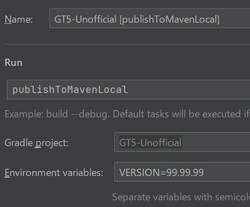
Sometimes you want to make cross-mod changes. In order to make use of code changed locally from another mod, use maven local.
- Run
publishToMavenLocalfor your dependency mod. Setting environment variableVERSIONallows you to publish it with specified tag, like 99.99.99 - Add
mavenLocal()to yourrepositories.gradlein your dependent mod, and changedependencies.gradleto your desired version.
Note that this doesn't work on GitHub, so in order to pass CI, you need to publish pre tag online. If you're not in the GTNH team, ask others to publish it.
Hotswap
Hotswap allows you to reflect code changes without relaunching the game. Use 1b. Run Client (Java 17, Hotswap) or 2b. Run Server (Java 17, Hotswap) to launch the game, and use Run > Debugging Actions > Reload Changed Classes to hotswap.
Dependency types
The following table shows if a source dependency - later called the Source - you included in Your Mod is visible to Your Mod and the mods that depend on Your Mod. For instance, implementation makes the Source visible to Your Mod at compile and runtime, but only at runtime to the Dependent mods, meaning that the Dependent mods are not able to use a class from Your Mod if it implements an interface from the Source. There are also test versions of some, you probably just want testImplementation.
| Source | Your mod | Dependent mod | ||
| Compile | Runtime | Compile | Runtime | |
| api | ✓ | ✓ | ✓ | ✓ |
| implementation | ✓ | ✓ | ✗ | ✓ |
| compileOnly | ✓ | ✗ | ✗ | ✗ |
| compileOnlyApi | ✓ | ✗ | ✓ | ✗ |
| runtimeOnlyNonPublishable | ✗ | ✓ | ✗ | ✗ |
| devOnlyNonPublishable | ✓ | ✓ | ✗ | ✗ |
| runtimeOnly | ✗ | ✓ | ✗ | ✓ |
| compile | Deprecated. Use api or implementation | |||
You can also read document on ExampleMod repository for details.
JVM flags
These are some useful JVM flags for development purposes. A full, detailed list can be found in the table below.
-Dmixin.debug=trueEnable Mixin Debug-Dmixin.debug.verbose=trueVerbose Debug Messages-Dmixin.debug.export=trueExport classes after mixins have been applied. If you include fernflower in your classpath, or copy org.jetbrains.fernflower into your mixin jar the exported classes will be decompiled-Dmixin.debug.countInjections=trueThrow an error if the injection count doesn't match expectations-Dlegacy.debugClassLoading=trueClass Load Debugging-Dlegacy.debugClassLoading=true -Dlegacy.debugClassLoadingFiner=true -Dlegacy.debugClassLoadingSave=trueDump classes to./RFB_CLASS_DUMP-Dfml.debugAccessTransformer=trueEnable debug logging of access transformers
| Flag | Default | Result | Code Reference |
|---|---|---|---|
| -Dfml.badPacketCounter | 100 | Sets the number of leaked packets before a warning is logged. | FMLProxyPacket |
| -Dfml.coreMods.load | Allows setting a comma separated list of coremod classes to load before "normal" coremods are discovered. | CoreModManager | |
| -Dfml.debugAccessTransformer | false | true: Logs detailed debug information when applying Access Transformers. | AccessTransformer |
| -Dfml.debugAPITransformer | false | true: Logs detailed debug information when processing @Optional annotations.
|
ModAPITransformer |
| -Dfml.debugExit | false | true: Logs the stacktrace before exiting the java application. | FMLCommonHandler |
| -Dfml.debugClassPatchManager | false | true: Logs detailed debug information when appling runtime patches. | ClassPatchManager |
| -Dfml.debugRegistryEntries | false | true: Logs detailed debug information about the block and item registries. | FMLControlledNamespacedRegistry |
| -Dfml.doNotBackup | false | true: Prevents the creation of a backup when loading an old or damaged save. | GuiOldSaveLoadConfirm |
| -Dfml.dumpPatchedClasses | false | true: Writes classes to a temp directory after runtime patching. The file locations are logged. | ClassPatchManager |
| -Dfml.dumpRegistry | false | true: Dumps the item registry to ./itemStackRegistry.csv after the mods have finished loading.
|
GameData |
| -Dfml.ignoreInvalidMinecraftCertificates | false | true: Continues loading the game even if an invalid Minecraft certificate was detected. | FMLSanityChecker |
| -Dfml.ignorePatchDiscrepancies | false | true: Continues loading the game even if discrepancies have been detected while applying runtime patches. | ClassPatchManager |
| -Dfml.LogContext | false | true: Adds a mod's name to the Log4J thread context (key: mod) before invoking the mod's event handler. The name is removed from the context afterwards.
|
ASMEventHandler |
| -Dfml.loginTimeout | 600 | Sets the time (in ticks) before a login attempt times out. | FMLNetworkHandler |
| -Dfml.modStates | Allows setting mod states by providing a (semi-)colon separated list of =-separated key/value-pairs. The value is a boolean representing the "enabled" state when "true". Example:
|
Loader | |
| -Dfml.noGrab | false | true: Prevents the mouse cursor from being grabbed when focussing the game. | MouseHelper |
| -Dfml.queryResult | Uses confirm/cancel to answer any queries during the load process.
|
StartupQuery | |
| -Dfml.readTimeout | 30 | Sets the time (in seconds) before a read times out. | FMLNetworkHandler |
| -Dfml.remappingDebug | false | Condition for -Dfml.remappingDebug.dumpFieldMaps and -Dfml.remappingDebug.dumpMethodMaps.
|
FMLDeobfuscatingRemapper |
| -Dfml.remappingDebug.dumpFieldMaps | false | true: Logs all field mappings of a class when that class is loaded. | FMLDeobfuscatingRemapper |
| -Dfml.remappingDebug.dumpMethodMaps | false | true: Logs all method mappings of a class when that class is loaded. | FMLDeobfuscatingRemapper |
| -Dfml.skipFirstTextureLoad | true | true: Skips the first loading of textures. | TextureMap |
| -Dfmlbuild.build.number | missing | FMLInjectionData | |
| -Dfmlbuild.deobfuscation.hash | deadbeef | Unused | FMLInjectionData |
| -Dfmlbuild.major.number | missing | FMLInjectionData | |
| -Dfmlbuild.mcpversion | missing | FMLInjectionData | |
| -Dfmlbuild.mcversion | missing | FMLInjectionData | |
| -Dfmlbuild.minor.number | missing | FMLInjectionData | |
| -Dfmlbuild.revision.number | missing | FMLInjectionData | |
| -Dforge.debugBlockEvent | false | true: Logs when (Multi)PlaceEvents are fired. | BlockEvent |
| -Dforge.debugBlockSnapshot | false | true: Logs creations/restorations of block snapshots. | BlockSnapshot |
| -Dforge.forceDisplayStencil | false | true: Initializes the LWJGL Display with 8 stencil bits.
false: Initializes the LWJGL Display with 0 stencil bits. |
ForgeHooksClient |
| -Dlegacy.debugClassLoading | false | Condition for the following three flags. true: Logs additional debug information when loading/transforming classes. | LaunchClassLoader |
| -Dlegacy.debugClassLoadingFiner | false | true: Logs additional debug information while class transformers run. | LaunchClassLoader |
| -Dlegacy.debugClassLoadingSave | false | true: Saves a copy of every class before and after each class transformer runs to the ./CLASSLOADER_TEMP directory.
|
LaunchClassLoader |
| -Dlegacy.debugClassLoadingSlim | false | true: Disables -Dlegacy.debugClassLoadingSave.
|
LaunchClassLoader |
| -Dmixin.checks | false | true: Enables all checks. | MixinEnvironment$Option |
| -Dmixin.checks.interfaces | false | true: Checks that all declared interface methods are implemented on a class after mixin application. Requires -Dmixin.checks=true.
|
MixinEnvironment$Option |
| -Dmixin.checks.interfaces.strict | true | If interface check is enabled, "strict mode" applies the implementation check even to abstract target classes. Setting this option to false causes abstract targets to be skipped when generating the implementation report.
|
MixinEnvironment$Option |
| -Dmixin.debug | false | true: Enables all mixin debugging options. | MixinEnvironment$Option |
| -Dmixin.debug.countInjections | false | true: Elevates failed injections to an error condition, see Inject#expect for details. Requires -Dmixin.debug=true.
|
MixinEnvironment$Option |
| -Dmixin.debug.export | false | true: Enables post-mixin class export. This causes all classes to be written to the ./.mixin.out directory within the runtime directory after mixins are applied, for debugging purposes. Requires -Dmixin.debug=true.
|
MixinEnvironment$Option |
| -Dmixin.debug.export.decompile | true | true: Allows fernflower to be disabled even if it is found on the classpath. Requires -Dmixin.debug.export=true.
|
MixinEnvironment$Option |
| -Dmixin.debug.export.decompile.async | true | true: Runs fernflower in a separate thread. In general this will allow export to impact startup time much less (decompiling normally adds about 20% to load times) with the trade-off that crashes may lead to undecompiled exports. Requires -Dmixin.debug.export.decompile=true.
|
MixinEnvironment$Option |
| -Dmixin.debug.export.decompile.mergeGenericSignatures | true | By default, if the runtime export decompiler is active, mixin generic signatures are merged into target classes. However this can cause problems with some runtime subsystems which attempt to reify generics using the signature data. Set this option to false to disable generic signature merging. Requires -Dmixin.debug.export.decompile=true.
|
MixinEnvironment$Option |
| -Dmixin.debug.export.filter | Export filter, if omitted allows all transformed classes to be exported. If specified, acts as a filter for class names to exportand only matching classes will be exported. This is useful when using Fernflower as exporting can be otherwise very slow. The followingwildcards are allowed:
Requires |
MixinEnvironment$Option | |
| -Dmixin.debug.profiler | true | true: Enable the performance profiler for all mixin operations (normally it is only enabled during mixin prepare operations). | MixinEnvironment$Option |
| -Dmixin.debug.strict | false | true: Enables strict checks. Requires -Dmixin.debug=true.
|
MixinEnvironment$Option |
| -Dmixin.debug.strict.targets | false | true: Enables strict checking for mixin targets. Requires -Dmixin.debug.strict=true.
|
MixinEnvironment$Option |
| -Dmixin.debug.strict.unique | false | If false, Unique public methods merely raise a warning when encountered and are not merged into the target. If true, an exception is thrown instead. Requires -Dmixin.debug.strict=true.
|
MixinEnvironment$Option |
| -Dmixin.debug.verbose | false | true: Enables verbose mixin logging (elevates all DEBUG level messages to INFO level). Requires -Dmixin.debug.export=true.
|
MixinEnvironment$Option |
| -Dmixin.debug.verify | false | true: Runs the CheckClassAdapter on all classes after mixins are applied, also enables stricter checks on mixins for use at dev-time, promotes some warning-level messages to exceptions. Requires -Dmixin.debug.export=true.
|
MixinEnvironment$Option |
| -Dmixin.dumpTargetOnFailure | false | true: Dumps the bytecode for the target class to disk when mixin application fails. | MixinEnvironment$Option |
| -Dmixin.env.allowPermissiveMatch | true | When mixin.env.remapRefMap is enabled and a refmap is available for a mixin config, certain injection points are allowed to fail over to a "permissive" match which ignores the member descriptor in the refmap. To disable this behaviour, set this property to false.
|
MixinEnvironment$Option |
| -Dmixin.env.compatLevel | Default compatibility level to operate at. | MixinEnvironment$Option | |
| -Dmixin.env.disableRefMap | false | true: Disables refmap when required. | MixinEnvironment$Option |
| -Dmixin.env.ignoreRequired | false | true: Globally ignores the "required" attribute of all configurations. | MixinEnvironment$Option |
| -Dmixin.env.refMapRemappingEnv | searge | When using mixin.env.refMapRemappingFile, this setting overrides the default source environment. However note that the specified environment type must exist in the orignal refmap.
|
MixinEnvironment$Option |
| -Dmixin.env.refMapRemappingFile | If mixin.env.remapRefMap is enabled, this setting can be used to override the name of the SRG file to read mappings from. The mappings must have a source type of searge and a target type matching the current development environment. If the source type is not searge then the mixin.env.refMapRemappingEnv should be set to the correct source environment type.
|
MixinEnvironment$Option | |
| -Dmixin.env.remapRefMap | false | true: Rather than disabling the refMap, you may wish to remap existing refMaps at runtime. This can be achieved by setting this property and supplying values for mixin.env.refMapRemappingFile and mixin.env.refMapRemappingEnv. Though those properties can be ignored if starting via GradleStart (this property is also automatically enabled if loading via GradleStart).
|
MixinEnvironment$Option |
| -Dmixin.env.shiftByViolation | warn | Behaviour when the maximum defined At#by value is exceeded in a mixin. Currently the behaviour is to warn. In later versions of Mixin this may be promoted to error.
Available values for this option are:
|
MixinEnvironment$Option |
| -Dmixin.hotSwap | false | true: Enables the hot-swap agent. | MixinEnvironment$Option |
| -Dmixin.ignoreConstraints | false | true: Ignores all constraints on mixin annotations, outputs warnings instead. | MixinEnvironment$Option |
| -Dmixin.initialiserInjectionMode | default | Behaviour for initialiser injections, current supported options are "default" and "safe". | MixinEnvironment$Option |
Remote debugging the whole pack
- Get post transform obfuscated class bytes: add
-Dlegacy.debugClassLoading=true -Dlegacy.debugClassLoadingSave=trueto JVM args and launch game. Be sure to enter the world and have the items you want to test to be spawned in game, or else the class you want to debug might not be loaded at all. find CLASSLOADER_TEMP in .minecraft folder. Delete every empty .class file (e.g.find . -empty -delete). Zip everything inside to a zip file and rename it to have a .jar suffix instead. - Add the .jar you just created as a library in an empty IntelliJ project. You can do it via Maven/Gradle if you want the hassle, or you can directly add it in project settings.
- add
-agentlib:jdwp=transport=dt_socket,server=y,suspend=y,address=5005to wait for a debugger to be attached to the game before running code, put this in launcher args to debug the full pack - In IntelliJ, use Run->Attach to process to attach the debugger to the running instance.
- Set breakpoints: line breakpoints mostly don't work as line numbers are most probably messed up. You need to rely on method breakpoints instead
ModularUI
If you're working on GUI features, this page could be useful: ModularUI
Useful tools and tricks for ingame testing
When fixing bugs or testing new features in-game, the right tools can save a lot of time.
| Name | Usage | Description |
|---|---|---|
| NBT-Edit | /nbtedit
|
Allows viewing and editing NBT data. |
| Item in hand | /iih (or /mt hand)
|
Displays basic data of the item in hand. |
| Copy Item Name | CTRL+C | Copies the name of the item currently being hovered over. |
| Copy Item ID | CTRL+X | Copies the ID of the item currently being hovered over. |
| Copy Item OreDictionary | CTRL+D | Copies the OreDictionary entry of the item currently being hovered over. |
| Debug Recipe Handler | Shift+D while viewing a recipe | Lets you edit and view debug information for recipes. Needs to be activated in the NEI settings (Inventory -> Recipes GUI -> Handler Info Widget). |
| Advanced Item Tooltips | F3+H | A vanilla feature to display additional item information on hover. |
| Thaumcraft research | /tc research <playername> all
|
Unlocks all Thaumcraft research. |
| List entity names | /feclass
|
List all entities for use in /summon command.
|
| Spawn infernal mob | /spawninfernal <x> <y> <z> <entity-name> <list-of-modifiers>
|
Spawn an infernal mob at specified the coordinates x,y,z (use ~ in place of x, y, or z is replaced by the respective value of the player running the command). Use ~ as the list of modifiers to assign random modifiers.
|