GT New Horizons · Getting started
Quest Book
Starting Tips
GTNH relies heavily on the Better Questing questbook, with more than 3,800 quests. You can theoretically play the pack completely without doing the quests, but this is only feasible if you already know the pack well. The quests not only guide you through the progression, but also explain various machines and mechanics, and give you hints on cool things to explore at your stage in the game. If you don't understand a mechanic or don't know how to proceed, the questbook should be the first place to look! Oh, and you also get cool rewards.
 You can open the questbook either by using the item you received at the start of your world, or more easily, by pressing a hotkey. You can find and set this hotkey with
ESC > Options > Controls > Open Quests. Make sure there are no key conflicts, or your chosen hotkey may not work.
Structure
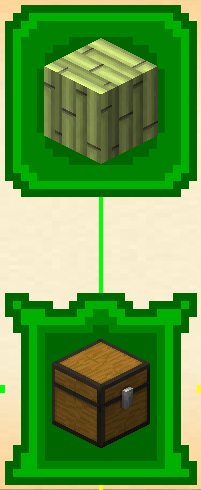
You don't need to complete every quest to progress. Some quests are marked as main quests; these define the progression path, and you will need to complete them to unlock new tabs and generally advance in the questbook. You can recognize main quests by their pointy corners, and they are also connected by thick lines. You’ll find information on various topics and explanations of game mechanics in these quests, so be sure to read them. Secondary quests are optional and provide ideas for what to do at your current stage, as well as useful machines and items to craft. You don’t need to complete these, but they are nice to have.
As you progress, you will unlock new tabs for the GregTech voltage tiers, tabs for specific mods and tabs with a shared topic for things which don't necessarily all belong to the same mod, but have something in common nonetheless. It's always worth look around new tabs under view mode. This should help get you familiar with the pack faster.
Completing Quests
When you open a quest, you will see the required actions on the right. This can have several steps you can swap between using the arrows. In most cases, you need to complete every step, so be sure not to skip anything. Some quests ask you to check in the ingredients before you are supposed to craft the final product. Most quests contain a Retrieval Task. To complete those, you just need to have the required items in your inventory for it to complete. You can also click the Detect button if it doesn't refresh automatically. The Optional Tasks are there to guide you, e.g., the amount of crafting ingredient needed for completing the final retrieval task. Especially at the start, there are a lot of Crafting Tasks. Those require you to actually craft the item in question, it is not sufficient to simply have it in your inventory. All crafting tables should work for this purpose. Finally, there are Consume Tasks, which will take the items requested, deleting them permanently. Click the Detect/Submit button to give consume items to the Quest Book. The required totals will be updated; the full amount of items does not need to be submitted all at once.
Rewards
Most quests will reward you either items related to the theme of the quest or a lootbag, often you will have to choose. The lootbags will give you random things more or less relevant in your current tier or trash. You can disable the trash by enchanting the bag with Fortune 3, but this isn't really viable before you can dupe the books with BiblioCraft and even then it is very expensive and often not worth it. In "Coins, Coins, Coins" tab of the quest book, you can exchange 3 same-tiered lootbag for a T+1 tiered lootbag (unenchanted). If the lootbag drop doesn't interest you, you could always just hold off until the next tier. Many early game quests will also award you with some food to help with hunger and raising max health. Additionally, you will get coins, which can be used in the aforementioned coin shop tab to buy various rewards. Those can save you some tedious crafting or provide you with new options. Some things to look out for are the ore berries, that can be planted on crop sticks for renewable basic metals, and ore samples for your ore finder wand for all the ores RNG doesn't want you to find. More option for coin shop will be unlocked as you progress through the questline, so don't be disappointed if the tab looks empty. Generally, the option to buy something shows up after you've completed the related quest. The most important coin shop item is perhaps the bee hives. This can save you a lot of times hunting for underground or other exotic bee hives.
Teams
Your team can join together in a questing party to share the quest progression. BetterQuesting does not sync properly over LAN, so groups need to have a server to connect to. Most quests, once completed, can have its rewards claimed once for each of the team member. Notable exceptions are quests in coin shops. They obviously won't give out multiple copy of its rewards for only one copy of coins consumed. If you persuade someone to join you in this trip to hell, *cough* I mean, adventure, after you already started, they can still join your party. Your progression will be synced to theirs, but all already completed quests will be rendered as claimed on their side.
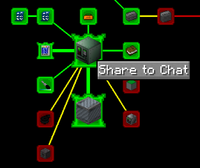
Right-click on a Quest to get a "Share to Chat" button. Press to print a clickable link in chat any player can use to quickly access the quest from.
Additional Features
If you are unsure how to get to a certain goal, you can activate "view mode" on the left side of questing panel to look ahead and see all the quests. The questbook has a search button on the bottom left. It can search not just for quest names but also the items involved and is very useful in finding explanations on a specific topic. A small number of quests are secret. They will only show once you do something specific or obtain a certain item. Not even view mode will show these.
Certain quest points may be skipped over automatically if the player triggers a special condition, usually by crafting a stack of a certain resource such as Titanium or Tungstensteel. This can be used to bypass quests for Challenge Runs, such as No Rockets.
Admin Stuff
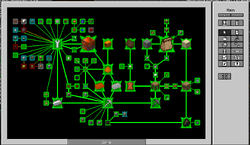
Sometimes a quest simply refuses to complete despite fulfilling its requirements. First check it's not a Crafting Task, which requires the item to be actually made not just held, nor a Submit Task which needs to be handed in with the Detect/Submit button manually. If you need help, go to Discord and ask. If you are sure it is a bug, go to github and report, if it hasn't been reported yet. In the meantime, you can complete the quest for yourself using commands. You will need to be OP for this on a server or have cheats enabled in single player. Alternatively in SP, Open to LAN and close again afterwards if Cheats are not enabled by default.
- v.2.3.0 or earlier: Show Quest ID's by enabling extended tooltips ->
F3 + H- Hover over the quest icon to view the ID; it's at the end of the title after a # symbol.
- v.2.3.1+: Right-click the quest and choose "Copy Quest ID".
- Use command
/bq_admin complete [Quest_ID] [player_name]. Replace [Quest_ID] with the number from the quest book, and [player_name] with the player's name who should have the quest completed.
If multiple quests need to be registered as complete, use this method.
- Command
/bq_admin editto toggle editor mode ON. - Open the Quest Book, click on Quests from the left panel and then a Quest Line.
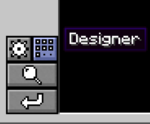
- In the lower left corner, click on the "Designer" button (small square dots), above the magnifying glass.
- A new panel should appear on the right. Click on the button with a square checkbox icon (Manual Complete).
- Click on each quest that should be complete once. Clicking twice will mark the rewards as claimed.
- The two rotating arrows button (Manual Reset) can change a quest back to its default state if required.
- When finished, click "Done" at the bottom center.
- Command
/bq_admin editto toggle editor mode OFF.
Remember to make backups from time to time, especially before you update or edit the Quest Book. The relevant files are in /saves/your_worldname/betterquesting/, with progress in the QuestProgress folder's .json file. Modpack updates often expand the Quest Book or fix quest related issues. Prior to 2.4.0, it was necessary to do /bq_admin default load once after an update to refresh your quest database. This is no longer needed and done automatically.
Skip & Hidden Quests
 Caution: | Spoilers Ahead! The following section contains spoilers, as it involves hidden quests that are meant to be a surprise or bypass regular checkpoint quests. Reader discretion is advised. |
|
|
Troubleshooting
1) Consume quest won't complete. Consume quests take the items from the player--destroying them. These have a manual submit button instead of automatic detection.
2) Tool quest won't complete. If the tool takes power, make sure it is charged.
3) Crafting task won't complete. Crafting tasks require the item to be made by the player after the quest is unlocked. They do not complete if the item or block is simply found and picked up.
4) Optional task won't complete. Optional tasks are not required to progress and remain incomplete after the quest is already finished. They do not affect progression or rewards.