GT New Horizons · Low Voltage (LV)
Logistics Pipes
Logistics Pipes is an item transportation, crafting and automation mod that can not only manage your storage systems but also provide flexible on-demand autocrafting with its piping network.
Logistics Pipes can be used for:
- Keeping a central inventory and crafting hub
- Automating certain production lines passively or actively
- Stock keeping to keep a certain amount of an item always stocked
- Autocrafting items and fluids
- Managing and simplifying fluid lines
See the guides at the end for these.
Pipes
Item Pipes
Unrouted Transport Pipe
Unrouted transport pipes are the first Logistics Backbone pipe you have access to, allowing items to transverse distances.
- Doesn't connect to any inventories
- Doesn't route items (don't use it for junctions)
Basic Logistics Pipe
This pipe is an upgrade to the unrouted transport pipes. It can route items. (You can use it for junctions.) This pipe is used for connecting the LP network to power via a "Logistics Power Junction". It is also the building block for all other pipes in the mod, so make sure you keep a lot stocked. When this pipe is connected to an inventory you can choose to set a filter, and set it as a default route. This allows the system to send items (either filtered or unfiltered.) to the connected inventory.
Provider Logistics Pipe
This pipe connects to an inventory and can extract items when requested. It also allows for Request Pipes/blocks to see the items in the inventory as a part of the GUI.
This also applies to any ME system, if connected to an interface.
MK2
Does the same thing as the MK1, just faster and with larger stacks.
Request Logistics Pipe
This pipe can request items from the LP network. It pulls from inventories with provider pipes/modules attached. It will output the items in connected inventories or drop them as an item if no inventory is attached. This still requires a wrench to access.
MK2
Does the same thing as the MK1, but has Thaumcraft integration and can simply be right clicked to open its GUI.
Supplier Logistics Pipe
This pipe can automatically request items. It can take advantage of autocrafting to fill inventories. This is great for keeping a certain amount of an item in stock.
It is important to note that a single slot can only have 127 items registered in it at the same time, but the same item can be in multiple slots if you require more than that - it's all added together.
It has 5 modes
- Bulk50 - Requests exactly the set amount of items when the inventory has half the amount of filtered items specified. It will fail if it cannot request the amount specified.
- Bulk100 - Waits for the entire inventory to be empty of the filtered items before stocking the entire thing at once with exactly the set amount of items. It will fail if it cannot request the amount specified.
- Infinite - Infinitely requests items, using the set values as a batch size.
- Partial - Requests exactly the missing amount of items in the inventory, compared to what is set and what can be provided. This is the safest mode for most applications.
- Full - Will try to request the full amount of the set of items at the same time, if the attached inventory's filtered items are below the set value. It will fail if it cannot request the amount specified.
Remote Orderer Logistics Pipe
Allows for wireless, infinite range requesting in the LP network via the Remote Orderer item bound to it, but requires Ender Chests to take full advantage of this.
Fluid Pipes
Logistics Basic Fluid Pipe
Acts as a default route for fluids. Must be filtered. You can filter it by selecting a fluid by clicking on the empty space or by dragging a fluid cell in via NEI. For certain fluids like Molten Tin you need to select it manually as there's more than one version of the fluid. It will fill an attached inventory with the specified fluid from incoming Fluid Packets.
Logistics Fluid Extractor Pipe
Extracts fluids from a connected inventory and sends a fluid packet into any Logistics Fluid pipes that can accept them.
Logistics Fluid Provider Pipe
This provides fluids whenever the LP system requests them. This is useful for autocrafting and Logistics Fluid Supplier pipes.
Logistics Fluid Supplier
Exports configured fluid to attached containers. This pipe allows you to set exact amounts of fluids to be sent into an inventory and can level maintain with the partial setting.
Logistics Fluid Request Pipe
When right clicked with a wrench, it will display all liquids currently in your LP Network. They can be requested down to the L/Mb and will be inserted into a connected tank.
Logistics Fluid Container Supplier
Supplies fluids to machines/tanks via buckets or bucket-like items like volumetric flasks. This is technically just a regular supplier pipe with the fluid supplier GUI instead but does not require Crafting Modules to perform this task.
Logistics Fluid Insertion Pipe
Imports fluids into the LP network passively, and will not compact packet sizes. Useful if you need near-immediate access to a given fluid as soon as it's made.
Chassis
Chassis are a special kind of pipe that don't do anything on their own, instead they have slots for modules. Modules dictate what the chassis will do, whether it be craft something, pull something, or keep a stock of an item. It has different tiers which affect how many modules the chassis can hold. Modules act like independent pipes inside the chassis and don't affect each other's behavior.
- MK1 - 1 Slot
- MK2 - 2 Slots
- MK3 - 3 Slots
- MK4 - 4 Slots
- Mk5 - 8 Slots
Blocks
Logistics Power Junction
The logistics power junction supplies power to the LP network. It can accept GT EU power natively, and can also be supplied with RF. Multiple Power Junctions can exist within one network, and pipes will draw power from the closest junction in the network to complete tasks.
Logistics Request table
This is a functional equivalent to the Crafting Terminal in AE2 but has some quirks due to items having to physically travel through pipes.
Recipes can be set in its crafting grid (but not put in said grid), and then can be requested via:
- ~: Requests the amount of missing items to complete one craft. It does not check the player's inventory for this, only the internal buffer inventory.
- +: Requests 1 crafts worth of items.
- ++: Requests 10 crafts worth of items.
- +++: Requests 64 crafts worth of items.
- x: Clears the grid.
You can then click the resulting item in the grid to "craft" that item if it's possible given your inventory contents and the internal buffer inventory's contents.
NEI can be used to register the crafting grid instead of manually, if desired. There's even functionality to decide which flavor of similar items to set, though it's recommended to just use the "most likely" button as that will poll the network and fill the grid with the most common variant in your network - or - barring that - the one made available through Crafting pipes/modules.
It plays semi-nicely with GT tools, though be careful to use the exact tool you have available.
There is also a slot in the table to dump items into the network manually.
It otherwise behaves exactly the same as an MK2 request pipe. Aspect integration included.
Modules
To make a well-organized storage system you need ItemSinks. A default route is good for a wall of chests, but it is important for things to be organized when dealing with more complex systems. There are a lot of these, so this will be a lengthy section.
ItemSinks
An ItemSink Module, when installed in a chassis, connected to an inventory, "sinks" or inserts, items into the inventory. They are often used for filtering bulk storage. (Drawers.) Different ItemSinks are used for specialized tasks and should not be be treated as interchangeable.
Basic ItemSink
The basic ItemSink can set something as a default route. You can do this for cheaper with a "Basic Logistics pipe", so there isn't much reason to use them. Basic ItemSinks are a crafting ingredient to all the other ItemSinks.
Polymorphic ItemSink
The Polymorphic ItemSink sorts things that are already present in the inventory. It is useful for sorting an inventory system with a lot of items inside, an example being Drawer Slices.
Mod Based ItemSink
Sorts items based on what mod they are from. This can be useful for smaller mods, but gets congested with larger mods like Gregtech. It works great for mods like Thaumcraft where you want all of your items close to your research table, but also LP accessible.
OreDict ItemSink
Sorts items based on OreDict names. Configurable in the GUI, you can change what OreDict names the OreDict ItemSink will allow to be sorted.
EnchantmentSink
Sorts any enchanted item into the connected inventory. It ignores durability of items.
MK2
Adds a filter to the GUI.
Type Filter ItemSink
Added by GTNH. Filters GregTech items by GT-Types, similarly to a Type Filter block with the GUI of an OreDict Itemsink. Types in GT are named groups containing similar items, more like a stricter version of Ore Dict.
Examples of existing types : dust, ingot, ore, crushedCentrifuged, gemFlawless; but also plate, bolt, wireFine, cable/wireGt(01-16)... Some additional Types were added by GTNH, so pay attention to more sneaky types like: cell, cellMolten, circuit, componentCurcuit.
Creative Tab Based ItemSink
Sorts things based on what tab they are in the creative inventory. Mostly functionally equivalent to the Mod Based ItemSink module.
Item Logistics
This section contains modules that make items move. There is no "family" of modules like the ItemSinks here.
Extractor Module
Extracts 5 items every second from an inventory, letting the network handle it as if it were inserted by other methods. If you apply more than one to a chassis, it will pull two packets of items instead of 1. (In layman's terms, it stacks.) It has "Sneaky" functionality, example being allowing a pipe on top of a machine to extract from the bottom.
MK2
Pulls 32 items, every second.
MK3
Pulls entire stacks, every tick. VERY LAGGY when stacked because of this.
Advanced Extractor Module
Same thing as the normal Extractor Module, allows for filtering what does and doesn't get extracted. There are upgraded variants as well, with the same overall stats.
Passive Supplier Module
Acts as a priority destination for the items configured in the GUI, much like the Basic Logistics Pipe. It does not actively request items.
Active Supplier Module
Sends active requests to the LP network for the items specified in the GUI, much like the Supplier Logistics Pipe. It will pull from the entire LP network to get the items it requests. This module can trigger Crafting pipes/modules, as long as their own requests can be satisfied.
Provider Module
Acts the same as the pipe, but pulls out 8 items every 2 ticks on request instead of 16 every half second
MK2
Provides more items (half a stack) at the same rate, matching the Pipe of the same name.
QuickSort Module
This is an Advanced Extractor MK3 module, but its filter Polymorphs based on items actually registered to the system for filtering via Itemsink and Terminus modules and basic pipes. It, thus, will not extract items to the default route.
Terminus Module
Acts as a last-resort destination for configured items. If there is not room in the system for registered items elsewhere besides the default route, they will be sent here instead. As the name implies, this is useful for a trashcan overflow for some super-bulk or infinitely produced items before localized void overflow becomes available.
Mod Integrations
Thaumcraft
Thaumic AspectSink
This ItemSink is a little misleading. It does not sort aspects, but rather items with specific aspects contained within. The Items can contain other aspects, unless specified otherwise.
For example: A chest with every item that contains Ordo.
Forestry Bees
BeeSink
Routes bees to connected inventories.
Apiary Refiller
Removes products of dead queen bees, inserts new drones and princesses into the apiary. This module cannot do breeding, only automation of already established bees.
Bee Analyzer Module
Acts as a high priority destination for unanalyzed bees entering the LP network. It will analyze the bees, and send them into a connected inventory. It can also be configured to extract the analyzed bees from the connected inventory and route them elsewhere to be utilized.
Drone Terminus Module
Acts as a last resort destination for drones, like the regular Terminus Module with more specific filtering for Drones.
Computer Craft
CC Based QuickSort
Acts akin to the Quicksort and Extraction modules, but requires OpenComputers for functionality instead of having its own built-in GUI - allowing for precise control.
CC ItemSink
Acts akin to the ItemSink modules, but does not have a type ~ meaning you can filter based on ALL known types in the system as well as Opencomputer's own item database system - meaning it requires it for functionality instead of having it's own built-in GUI.
Miscellaneous Modules
Electric Buffer Module
Acts as an ItemSink for items that can store power.
Electric Manager Module
This Module can automate charging and discharging of items. It can be set to charge a battery. It will send the battery to its connected inventory, (A block that can charge items.) and will extract it once fully charged. It can also discharge the battery, (Send it to be used). This is limited only to IC2 energy buffers and IC2 chargeable items (for now). GT machines, battery buffers, as well as GT batteries won't work.
Logistics Disk
While not technically a Module, it is applied like one. This is a powerful item (That may or may not be disabled in GTNH.) that can create macros which various modules can respond to. This is great for keeping items stocked. It must be attached to a MK2 or better Logistics Chassis.
This is also used in Request Pipes and the Logistics Request Table for both making Macros in the first place and manually triggering them. Useful for getting materials for multiblocks!
Upgrades
Item Speed Upgrade
Can be applied to any pipe
Accelerates items that transverse the pipe with the upgrade, much like a Buildcraft Gold pipe. These stack up to 16 per slot. Plenty powerful en-masse, as there is no such thing as friction in a Logistics Pipes system.
CC Control Upgrade
can be applied to any pipe
This allows configuration/usage of a pipe via OpenComputers.
Disconnection Upgrade
can be applied to any pipe
Disconnects pipe connections in cardinal connections
- Up - Disconnects Up
- Down - Disconnects Down
- North - Disconnects North
- South - Disconnects South
- East - Disconnects East
- West - Disconnects West
Sneaky Upgrades
can be applied to any pipe and ItemSink modules
These "Sneak" items into a face of a block the pipe is not connected to. Sneak can be translated into "insert". These upgrades allow you to insert items into other sides of a block despite being visually connected to - as an example - a machine's facing side. It is advised to use F3 or Journeymap to find directions.
- Up - Sneaks Items into the top face
- Down - Sneaks items into the bottom face
- North - Sneaks items into the North face
- South - Sneaks Items into the South face
- East - Sneaks items into the East face
- West - Sneaks items in the West face
- Combination - Allows multiple sneaky settings to exist in one upgrade
Crafting Monitor Upgrade
can be applied to Logistics Request Table
This allows a request pipe or the Request Table to track active requests that they made in the network in a request tree. Items will be visually shown on the tree as green dots as they move through the network. This does not allow tracking of Supplier Pipe's requests.
Fuzzy Upgrade
can be applied to Crafting and Basic pipes and Crafting and ItemSink modules
This allows Crafting and ItemSink pipes and modules to handle other similar items than the one registered in their GUI, utilizing oredict, NBT, damage, and other assorted metadata.
Opaque Upgrade
can be applied to any pipe
Makes the pipe opaque and disables rendering of the items that move through it. This is more of a performance-saving measure than anything and only on the client.
Advanced Satellite Upgrade
can be applied to Crafting pipes and modules
Allows you to specify the satellite destination for each crafting item independently inside the crafting pipe or module. Useful for recipes that require multiple separate inputs such as assembly line recipes.
Fluid Crafting Upgrade
can be applied to Crafting pipes and modules
Allows you to specify a single fluid input for crafting pipes and modules, fluids will be sent to the fluid satellite pipe with specified satellite id. If combined with advanced satellite, each fluid will have a separate satellite id. Fluid crafting upgrade needs a fluid satellite pipe to work, it will not send fluids directly into the machine. An unlimited number of upgrades can be inserted into the pipe, but only the first 3 will provide a fluid slot, other upgrades will be ignored.
Crafting Byproduct Extraction Upgrade
can be applied to Crafting pipes and modules
Allows you to specify 1 crafting byproduct that will be extracted along with the crafting result.
Placement Rules Upgrade
can be applied to Supplier pipes and Active Supplier modules
Allows you to set a specific slot that supplied items will be placed into (may be useful for reactor automation if you are insane enough)
Crafting Cleanup Upgrade
can be applied to Crafting pipes and modules
Removes extra items from the crafting inventory once crafting is done, has 3 filter slots with white/blacklist
Upgrade Module Upgrade
Allows you to use a single upgrade for each module in a chassis pipe, as if that module was a pipe itself. It is mostly used for autocrafting via a chassis, which is not ideal because it can be both significantly more expensive and less flexible.
Basic Storage system
A good storage system needs a few things: A place for items to go, A place for bulk items to go, and a way to access them all in one place. Luckily LP has all of that, and more!
This will tell how to make a basic storage system with LP!
Creating the network
The first step is powering the network. You can do this by connecting any type of generator directly to a Logistics Power Junction. The Junction can be anywhere on the network and it will supply power to the entire system.
Next you want to have a place to insert and extract items. This can be done with a Logistics Request Table, but cheaper with a Request Pipe.
Now you want a place for items to go. There are a few ways of doing this. A cheap setup will be a single Basic Logistics pipe with a default route, a chest to buffer items, and a provider logistics pipe. Provider pipes can see all connected inventories around them, so get creative with your mass storage! What happens between the Basic pipe and the Provider pipe is basically up to you!
For bulk storage attach a MK1 chassis to a storage controller and insert a Polymorphic ItemSink. Attach a provider pipe to the controller as well. If you are able to splurge a little, you can instead subsitute the provider pipe with a provider module. This can also be done on an individual drawer/barrel basis with a basic logistics pipe.
Now you have a basic LP Storage Network! Enjoy!
Autocrafting
The biggest aspect of this mod is its sophisticated autocrafting! It is able to hold potentially infinite* recipes for each machine! It just takes some. . . "Creative engineering solutions"! It is also capable of autocrafting with fluids*! It is important to note that you cannot cancel an autocraft request. The only way to clear the system of requests is by restarting your server, reloading your world, or physically breaking every pipe with a purple particle storm in them - which indicates an active wait condition on a given craft.
It is important to note that every pattern is a "processing" pattern, in AE2 lingo. It does not care what happens to the items sent to the pipe or satellites, only that it expects the item you registered as the "product" to appear in the inventory actively attached to the Crafting Pipe/Module. Given the lack of autocrafting batch size limitations in LP, this can allow for some creative problem solving.
*Machines like assemblers can get clogged if you aren't careful.
*While LP can craft With a single fluid through an upgrade, It can not Craft fluids directly. You can get around this by actively exporting items to fluid extractors and importing the fluids, or by abstraction using Cells. Be warned that, because of this, fluids will NEVER form links in crafting chains directly. Build accordingly.
Autocrafting Essentials
Pipes
Crafting Logistics Pipe
This pipe is similar to an AE2 Pattern. You tell it what to input (as a single supply request), and what to expect back in return (Which will be provided at the same rate as regular provider pipes once finished). It also has an area of three slots that can be set to a single satellite frequency. Satellites each have a number, or frequency, attached to them. Set it to the same number as the Satellite you want to send the items to and the LP network will route the items to that Satellite. If you want more fine control over what items go where, see the Advanced Satellite Upgrade.
MK2
Can craft up to 16 items at a time, and will provide as such every half second.
MK3
Can craft a stack of items at a time, 2 ticks each time - item latency willing.
Satellite Logistics Pipe
Items are routed to this pipe when told to by a Crafting Logistics Pipe.
Note: it is advised to keep track of what machines have what Satellite with a clipboard. A good format is
[Machine type] [Circuit #] [Satellite #] [Fluid Satellite #] Example for coating wires: Assembler C24 S12 F5
Rule: Each Crafting Logistics Pipe can only be set to one Satellite without an upgrade, but each Satellite can have an unlimited amount of crafting pipes set to its frequency.
Fluid Satellite Logistics Pipe
This pipe requires a Fluid Crafting Upgrade. Routes fluids directly for autocrafting tasks. The same rule of the item version applies.
Upgrades
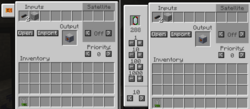
Fluid Crafting Upgrade
Adds a section in the crafting pipes GUI. Allows you to set a Fluid Satellite, a type of fluid, and an exact amount of the fluid. The fluid can be set using an NEI ghost cell.
Advanced Satellite Upgrade
Applies to a Crafting Logistics Pipe, Allows every slot of the crafting GUI to be sent to any Satellite pipe instead of just 3 to a single satellite pipe. This is useful in long chains that need inputs in different places - an Assembly Line as an example.
Crafting Byproduct Extraction Upgrade
Extracts exactly a single extra filtered item from the connected inventory when the crafting completes.
Crafting Cleanup Upgrade
Advanced version of the cleanup upgrade, which basically attaches an Advanced Extraction Module to the crafting pipe with the functionality that entails. It will act when the crafting pipe itself isn't active.
Modules
Crafting Module
Acts as a Crafting Logistics Pipe, just inserted into a chassis. This brings things closer to how you would do it with patterns and interfaces in AE2.
MK2
Same as Crafting Logistics Pipe MK2
MK3
Same as Crafting Logistics Pipe MK3
Blocks
Logistics Crafting Table
This is the equivalent of an AE2 Molecular Assembler. It can only be set to one recipe. These need a Crafting Logistics Pipe on them set to the same recipe for the Request Table to be able to see it as an available recipe. It is important to note, these don't play nice with GT tools without fuzzy upgrades and the fuzzy variant.
Despite their speed, they are also quite expensive. It is recommended to look for alternatives - such as the Auto Worktable from Buildcraft, or the Automatic Crafting Table from Project Red.
Tools
Item Pipe Sign Creator
Works on Logistics Crafting Pipes, and Logistics Crafting Tables. Creates a sign on the pipe that visually shows what recipe is stored within. It can also be swapped to an Item mode which places an updating sign on a logistics pipe that can act akin to a storage monitor.
Logistics HUD Armor
When worn on the player's head, it displays a visual HUD of everything happening in your LP network. This can be useful for seeing what satellite uses what frequency if you don't write them down. It also shows what modules are in a pipe, and you can even edit them without being in the pipes GUI. This can save on wrench durability.
Note: It wont show what's in crafting pipes that were configured before the glasses were crafted unless you open the pipes again.
Remote Orderer (Item)
("Requesting tool" - per Direwolf20)
You can right click ANY routed pipe (meaning not backbone pipes like unrouted transport pipes - the remote orderer pipe is included as well) with this to bring up a request interface as if that pipe was a Request Logistics Pipe. Requested items will be dumped into a nearby valid inventory, or thrown out in the world based on the side clicked.
Autocrafting
Note: LP is expensive and requires very late LV to start autocrafting. Remember, the first thing you autocraft, should be the stuff needed to autocraft. LP is an old mod and is the progenitor of the autocrafting paradigm - leading to some quirks. However, most if not all early-mid game crafting can be performed with it, and scales surprisingly well if you can handle the item/fluid latency.
Theory
- Items are not digital, input buffers are required.
If you place bare pipe on a machine, and request thousands of items, those which won't fit will travel back and forth, and after some time will be rerouted back to the sorting component of the network - only to be pulled out again if there is even a possibility that item will fit. This can rapidly cause a power death spiral of the network. There is no sort of blocking mode ether.
- Craft is "centered" on a Crafting Pipe/Module.
In practice, Crafting pipes are just provider and request pipes rolled into a single pipe. It will trigger a request for the line of items and their amounts set in the GUI to it once a request rolls in and expects the item placed in the larger "Result" slot to appear in its connected inventory before the heat death of the universe. This is repeated if other crafting pipes respond to the original crafting pipe. This is the primary difference between how LP handles autocrafting and what you will encounter later with AE2, where the entire system is aware of active crafts and will pull matching items into the crafting cpu's buffer automatically as soon as they enter.
- You cannot cancel a request once made
As items are not digital, nor are they inherently internally buffered in any way, if you make a request and something goes awry - you must destroy the parts of the network that were triggered by the request to reset them.
Examples of automation
Note: sadly, one of the strongest tools of LP automation -- Satellite Pipes, really sucks due to the original poor UI implementation (Satellite IDs are hard to set if you have many of them). If you are planning to build a big LP system, their use should be minimized. They might be improved by GTNH devs in a future: https://github.com/GTNewHorizons/GT-New-Horizons-Modpack/issues/17984, and if they will, most information below will be obsolete and just use them instead of filtering.
1) Complex recipes
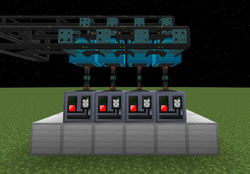
Where being complex means requiring different items, which most recipes do. They cannot be shared with simple extraction from a single chest into multiple machines, one input chest should be used only by one machine.
To minimize use of Satellite pipes, an item filter is used on blacklist mode, listing inside items that the machine is going to perform. Use two cheap EnderIO filters one on extraction side of chest, one on insertion for the machine to save time on crafting upgraded ones. For assemblers and machines with big inventories and recipes with many inputs, the amount of recipes per machine should be low to minimize jams. Usually, recipes that activate when something big is requested like a machine should be put on separate assemblers. (motors and pumps for example cause a jam when a pump is requested)
Note: yes, with this setup there are some heavy restrictions of 8-10 recipes that can be programmed for machine. Also because of Blacklist we cannot share recipes where one result can be an ingredient in another recipe. But the sad reality is that there's no features like the AE's Blocking Mode for small scale item management, and you need to split your recipes within a lot of machines anyway to avoid jamming.
Also, If you need to parallelize complex recipe, you can just add another copy of Crafting module to another machine, and upon requesting craft LP will split resources between all the copies.
2) Simple recipes parallelization
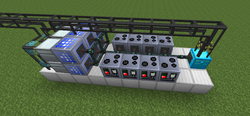
Simple recipe is a recipe where only one item type is needed. In GTNH recipes like this are only a few and they need to be parallelized (like plates, wires...) but it's easy to do. You would need to do some filtering in the end, if you are past the point of a single chest, and one of the filters that can be used is GT Filter block that has 9 slots for filtering.
Another cool trick you can do with GT Filters is perform recipes which require number of the same items as the simple ones:
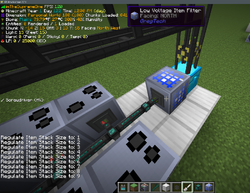
If you are crafting dense plates, you would need to put a filter as a buffer between input chest and the rest of machines, set stack size to 9, set filter to empty Blacklist to accept any items. The connected conduit should be inactive, preferably in "never active" state, with a Round Robin turned on. This way insertion will be done only by GT item filter, which was programmed to insert only exact item quantities to prevent machines from jamming when spreading items too thin. However the round robin on a Conduit will still work even when items are inserted by filter.
Is autocrafting worth it?
Autocrafting can be very powerful, as it allows you to skip all the microcrafting and focus on other tasks like gaining materials and making new machines, but at the same time you need to invest a LOT of time and resources into it. It's also very unintuitive and lacks responses, with things like Satellite pipes and crafting upgrades barely explained. There's also the question of how long LP will be relevant for as you unlock AE2 in the EV age, which is an immediate upgrade compared to anything else you might be using - but can also plug and play WITH a fully mature LP system as a mass storage medium.
You need a lot of machines to handle all the crafting tasks you request, especially if you keep a stock of items. Machines get jammed with items if two or more items get requested at once and they're all sent to the same machine. To fix this you need to keep a large array of machines that handle different recipes that don't conflict with any other recipe, meaning when you request a big item like a machine all the crafting tasks are split across different assemblers. This is a problem only with machines that handle more than one to two inputs, as "simple recipes" can't clog the machine. You also need to watch out for circuit collisions, that is when you accidentally craft something you don't want because the preprogrammed circuit is set to the wrong number. Generally if a recipe doesn't have a number, you should only use assemblers for that task that don't have a circuit number.
LP autocrafting is only worth it if you:
- have lots of resources and have the existing infrastructure to start automating things
- have lots of patience at the start to setup everything
- do not want to deal with the Crafting CPU mechanics of AE2
- want to be rather cheap on power consumption
- have lots of space and room to expand in the future
- want to have a fun challenge to solve
This only applies to autocrafting, for stock keeping and manual crafting, LP is the best and cheapest option for early game. LP is very plug and play when it comes to having a central inventory and crafting hub, only when it comes to autocrafting does everything get complicated.
References
- http://rs485.thezorro266.com/wiki - Wayback machine, very little information.
- https://github.com/RS485/LogisticsPipes