GT New Horizons · Extreme Voltage (EV)
Ore Drilling Plant
The Ore Drilling Plant (Multiblock Miner or MBM) is an EV tier multiblock for mining ores and small ores in the surrounding chunks. The MBM is a direct upgrade from the singleblock miner because it has a significantly farther range, a faster mining speed, a higher fortune bonus for small ores, and approximately 3x more yield from regular ores. The MBM is also available in four tiers to help it scale and the only input requirements are power, mining pipes, and 2,000L of drilling fluid per ore. Ores are mined one at a time from top to bottom across the entire working area and are generally outputted as crushed ore, but small ores may also drop normal and impure dust. Inside the GUI of the controller are options for chunkloading, replacing mined ores with cobblestone, and setting the current radius. The MBM is superseded by the Void Miner in ZPM.
Construction
The MBM is available in four tiers but the only structural difference between them is the type of casings and the controller itself. Buses/hatches may replace any casing anywhere on the bottom layer of the structure. Multi-amp and laser energy hatches are not supported, but there can be multiple regular energy hatches for overclocking. The tier of the machine determines the minimum energy hatch tier. Use the Multiblock Structure Hologram Projector to visualize/build the structure.
 Caution: | Don't forget to protect the machine from rain and/or meteors! |
Base Structure
Tier 1
Tier 2
|
Tier 3
Tier 4
|
Wallsharing
MBMs may wallshare each of their sides to save on casings and buses/hatches. The MBM only consumes 0.375A of power so it is possible to share one energy hatch between four machines. However, it is highly recommended to spread them out across many different chunks instead of placing them close together to cover more ground and mine a larger variety of ores at once.
Usage
The MBM is a direct upgrade from the singleblock miner because it has a significantly farther range, a faster mining speed, a higher fortune bonus for small ores, and approximately 3x more yield from regular ores, as seen in the following table. The MBM can also run any number of imperfect overclocks to go even faster. The range is the total area centered on the controller.
| Type | Tier | Base Stats | Range | Fortune (Small Ores) |
Yield (Regular Ores) | ||
| Voltage | Power | Speed | |||||
| Miner | Basic | LV | 8 EU/t | 8s per ore | 17x17 Blocks | I | x1 |
| Good | MV | 32 EU/t | 4s per ore | 33x33 Blocks | II | x1 | |
| Advanced | HV | 128 EU/t | 2s per ore | 49x49 Blocks | III | x1 | |
| MBM | T1 | MV | 48 EU/t | 12s per ore | 96x96 Blocks | IV | x3 |
| T2 | HV | 192 EU/t | 5s per ore | 128x128 Blocks | V | x3 | |
| T3 | EV | 768 EU/t | 2s per ore | 192x192 Blocks | VI | x3 | |
| T4 | IV | 3,072 EU/t | 0.75s per ore | 288x288 Blocks | VII | x3 | |
Use a soldering iron, wire cutters, or screwdriver on the controller to adjust the settings for chunkloading, replacing mined ores with cobblestone, and the current radius, respectively. Or adjust everything manually inside the GUI of the controller. The chunkloading applies to both the chunk that the machine is in and the current operating chunk--no ServerUtilities required.
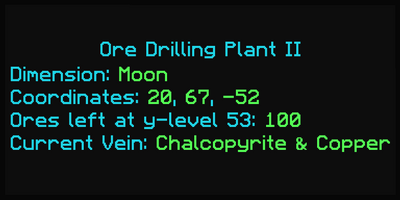
It is highly recommended to add a metrics transmitter cover to every MBM because it helps track its location and total progress, as seen in the following image. Right-click the controller with the cover in hand to convert it into a GregTech advanced sensor card and then place that in a NuclearCraft industrial information panel. The panel does not consume any power, but the basic version needs to be enabled with a redstone signal. JourneyMap waypoints also help, but they only work on the same planet/dimension.
 |
|

Mining Pipes & Drilling Fluid
The MBM uses mining pipes to reach ores deep underground. Mining pipes may be inserted through an input bus or placed in the controller slot and they deploy straight down from the bottom center of the structure as soon as the machine is enabled. Ores are only mined on the y-level of the lowest mining pipe and the machine only moves down to the next y-level after clearing everything on the current one. The mining pipes stop once they reach bedrock or the void and then automatically retract back up into the machine. If necessary, press the "abort and retract mining pipes" button inside the GUI of the controller to immediately stop the process at any time. Mining pipes are returned first to the controller slot and then the output bus if there is no more room left.
| Caution: | Mining pipes void everything they pass through. Ensure nothing important is below the center of the machine. |
Every ore costs 2,000L of drilling fluid to mine regardless of the tier of the structure or the length of the operation. Drilling fluid is made in an LV mixer from water, stone dust, and lubricant. Mass produce lubricant from redstone, soapstone, or talc dust and any kind of oil in an LV brewery. Store drilling fluid in a super tank next to the MBM, or use one of the logistics methods in the next section to provide it remotely.
Output
Ores are mined one at a time from top to bottom across the entire working area and are generally outputted as crushed ore, but small ores may also drop normal and impure dust. Regular ores have 3x the yield as normal and small ores scale with the fortune bonus of the machine. The MBM does not mine ores above it so always place the machine near the surface of the planet/dimension to guarantee that it finds everything. Every ore mined is replaced with cobblestone for free by default, but that can be disabled in the GUI of the controller to leave air gaps instead.
Expect hundreds or even thousands of stacks of crushed ore from a single MBM before needing to move it. Store the ore in a compressed chest or an ME output bus with caching mode enabled to be picked up later, or use one of the logistics methods in the next section to automatically transfer everything to an ore processing setup. Expect to move MBMs every few hours depending on its range, speed, and initial y-level.
Logistics
The best ore veins are not always nearby. It is very common for the MBM to be separated from a player's main base, such as on a different planet. The following are a few ways to transport power, items, and fluids across long distances or dimensions.
Method 1: Long Distance Piplines
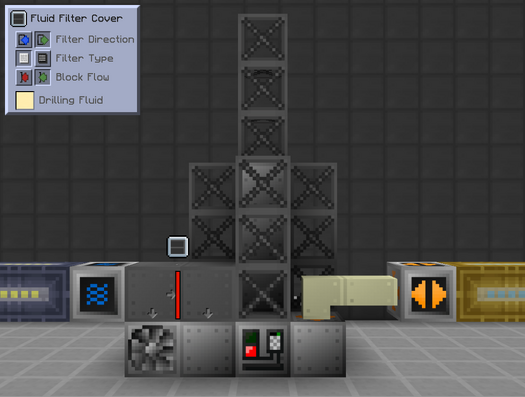
The core mechanic behind this approach is using a long distance fluid pipeline to transport both fuel and drilling fluid to an MBM, and then using a long distance item pipeline to transport the ores back. Recall that both long distance pipelines must span at least 64 blocks (4 chunks) and do not auto-push or auto-pull. This approach is unlocked very early on but it is difficult to build/destroy for machines that are far away and it cannot cross dimensions.
| STEP 1 | |
| Place quadruple fluid pipes on both ends of a long distance fluid pipeline. Push fuel and drilling fluid through the pipeline to supply them to a singleblock generator and input hatch, respectively. Configure a fluid filter cover to prevent the fuel from going into the input hatch, or use a quadruple input hatch.
Place item pipes leading from the output bus of the MBM to a long distance item pipeline. This transports the ores back for processing. Diesel and other liquid fuels are very energy dense so another viable strategy is to just leave a pre-filled tank out next to the combustion generator and only import the drilling fluid. |
|
Method 2: Quantum Ring
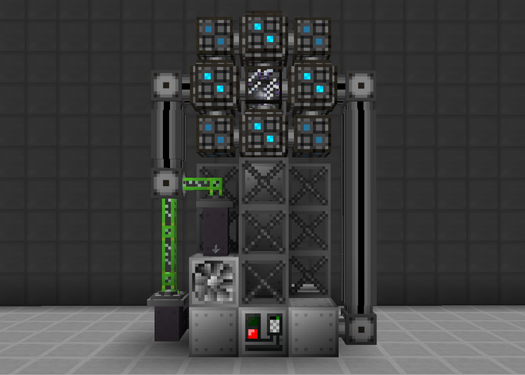
The core mechanic behind this approach is using an AE2 Quantum Ring and P2P tunnels to transport power, items, and fluids across any distance or dimension. Recall that Quantum Rings need a quantum entangled singularity inside the central chamber and that they initially require power on both ends to first connect. This approach is compact, flexible, and scales the best, but there is a 5% power loss for EU P2P tunnels and higher idle power consumption from the AE2 components.
| STEP 1 | |
| A Quantum Ring provides a local connection to the main network (green). Supply fuel and drilling fluid through their own fluid P2P tunnels, or potentially the same one if using quadruple fluid pipes and a fluid filter cover.
Connect the ME output bus directly to the main network for storage, or use an ME P2P tunnel to transport the ore directly to an ore processing subnetwork. It may be helpful to include an ME storage cell for a larger buffer. Singleblock generators for higher voltage tiers are not very fuel efficient so it may be better to use an EU P2P tunnel instead. |
|
Method 3: Ender Chests/Tanks
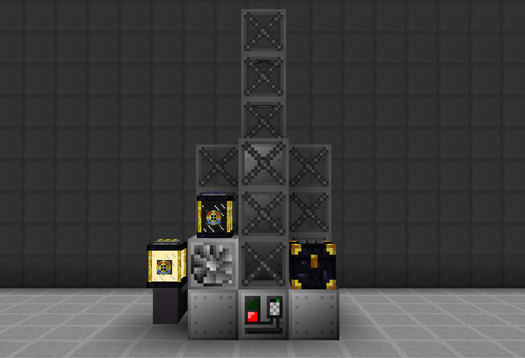
The core mechanic behind this approach is using ender tanks to transport both fuel and drilling fluid to an MBM, and then using an ender chest to transport the ores back. Recall that ender chests/tanks must match the color combination on top to link. This approach is the quickest and easiest to set up, but requires Thaumcraft progression and/or luck with lootbags.
| STEP 1 | |
| Supply fuel and drilling fluid through their own ender tanks. Set them to auto-output into a singleblock generator and input hatch, respectively.
Face the output bus into an ender chest to transport the ore directly to an ore processing setup. On the other end, use a high-speed conveyor or storage buses to pull the ore out of the ender chest as fast as possible. If using plasma for fuel, then it is perfectly viable to leave a pre-filled tank next to the machine instead of using a second ender tank. However, that does create a manual task at a point where most everything should be automated. |
|