GT New Horizons · Thaumcraft
Infusion Automation
When automating the Infusion Altar from Thaumcraft, you might run into some issues. The altar has somewhat special item handling, that won't let you slap AE right onto it. Getting the items into the right spots, with AE support, and then starting the infusion all have their own hurdles. Even returning the finished item can be a little difficult due to the structure having no clear distinction between in/out slots.
Options
For this task we do have a lot of options. Applied Energistics, OpenComputers, Steve's Factory Manager, any GT pipe + Redstone, as well as variation in these setups. Below are some explanation of how to go about using each, as well as their strengths and faults. As usual there isn't a clear winner, and you can do it any way you please, but sometimes it's difficult to find even one that will work.
Universal Requirements
The Infusion Claw
The Infusion Claw from Gadomancy is one possible way to start infusions automatically. It's a small contraption that is placed above the infusion matrix that requires a wand or staff to function. When the claw receives a redstone signal, it tries to begin the infusion process. If it succeeds, the infusion will begin and a small amount of vis will be consumed from the wand or staff. Amber wands and staves do not recharge themselves while inside the infusion claw, you therefore need to find a way to recharge the wand automatically.
The Block Placer
The Block Placer from ProjectRed is another possible way to start infusions automatically, with distinct advantages and disadvantages over the Infusion Claw. While it can start infusions without causing instability or draining a wand, it does not link directly with your research like the Infusion Claw does, requiring that it be given a Tome of Knowledge Sharing (bound to you) alongside the wand (place both into its item slots). Similarly to the Infusion Claw, it will use the wand on the Runic Matrix when it receives a redstone signal, activating it if there is a valid recipe. While it can randomly lose access to your research, leaving the Tome in its inventory renders this a non-issue.
The Dynamism Tablet
The Dynamism Tablet from Thaumic Tinkerer can also start infusions automatically, and without the redstone signal that the aforementioned methods require. It does require using a Tome of Knowledge Sharing to gain your research, though as it only has one item slot, it is required to manually give it the Tome after each new research. This method has the following observed issues, however:
- After right clicking continuously for upwards of several hours, it is likely that it will stop right clicking until the item inside is removed and re-added.
- Like the Block Placer, it can randomly lose access to your research, but it having only one item slot prevents it from automatically regaining the research (as it cannot hold a Tome of Knowledge Sharing and a wand simultaneously).
Optional: The Infusion Interceptor
The Infusion Interceptor from Thaumic Insurgence can be used to speed up infusions significantly by providing all the essentia needed for an infusion within a single tick. Simply place it under the center pedestal and attach it to an Essentia Provider it that is linked to your digital essentia storage.
Optional: World Accelerators
World Accelerators (WA). When in tile entity mode (right click them with a screw driver, the text TE should appear in the corner) and provided with 6A of power, they will accelerate the infusion altar when placed adjacent to the matrix. Some infusions can take upwards of a minute, which makes this a must for lategame crafting.
Applied Energistics 2 Setup
This setup uses an AE2 sub-net and a single comparator to automate the entire infusion process. In order to build this setup you'll need:
- 1 Redstone Comparator
- 2 ME Interfaces
- 1 Quartz Fiber
- 1 Advanced Blocking Card
- 1 ME Controller
- 1 Vis Charge Relay
- 1 Vis Relay Interface
- 1 Vis Relay
- A ME Storage Bus for every pedestal around and under the infusion Matrix
- Some AE2 cables to connect everything.
The Storage Busses
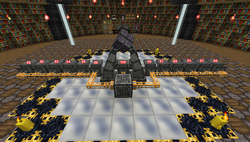
Place down a storage bus on every pedestal (including the one under the matrix itself). The storage bus for the center pedestal should have the highest priority value, with the rest having a descending values. The goal should be to have the items appear in opposite slots. The easiest way to do this is to put them in a horizontal line from the center pedestal.
Receiving the items
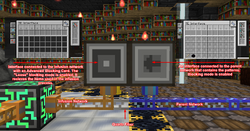
In order to send the items required for the infusion process, we'll need 2 interfaces. The first one is connected to the AE network that will be ordering the crafts.The second is connected to the isolated network we just setup in the previous step. It should also contain an Advanced Blocking Card and have the advanced blocking mode set to "Loose".
Triggering the infusion
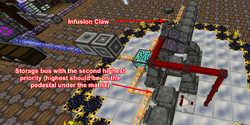
In order to automatically start the infusion, you'll want to place a comparator on the outer pedestal that has the highest priority. The output of that comparator should be linked to the infusion claw above the infusion matrix.
Collecting the outputs
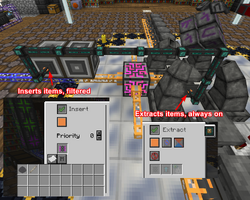
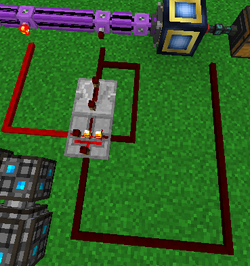
There are plenty of ways to collect the outputs from the infusion process. Here are some examples:
- A simple yet effective solution is to extract the items from the center pedestal using EnderIO's item conduits and to use some filters to ensure you only extract the outputs of your recipes.
- You could also use a 2nd AE2 network that has an import bus connected to the center pedestal and a filtered storage bus on connected to the interface that contains the patterns.
- Another method is to use a Transfer Node from Extra Utilities filtered with an Advanced Item Filter which is set to "HasDisplayName.exe" and is inverted by crafting it with a Redstone Torch. This will only allow it to move items which do NOT have a custom display name (which applies to all Infusion recipe outputs), only requiring that the central item be renamed prior to the recipe starting. A Mold (Name) in a Forming press can be used for this purpose, as can an Inscriber Name Press in an Inscriber.
The first two of these options aren't perfect as the outputs of certain infusions are also used as the center item of other infusions. More complex solutions using OpenComputers[1] or Steve's Factory Manager do exist, but if you don't want to bother, you can simply build a second infusion setup and keep it simple that way.
You can also use redstone to trigger the collection of the output by using two level emitters both set with no items with the first one with redstone mode set on the >= mode with 1 and the second one with the < mode with 2. Finally you have to make sure that you dont extract when the AE2 system is starting to insert items.
Automatically recharging the wand
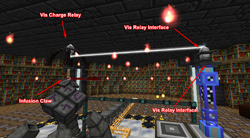
Since the wand looses a slight amount of vis every time an infusion is triggered it's important to add a mechanism to recharge the wand. You can use a vis charge relay placed on top of the Infusion Claw to passively charge your wand or staff stored inside the infusion claw.
Steve's Factory Manager Setup
Sfm is one of the easiest options. No lua, and no complex redstone. The setup is fairly simple here you will mostly be using commands to see if certain pedestals are full or not, and using this to preform 2 discreet actions.
If you wish to skip reading about it, here is a visual tutorial explaining the same concept: https://youtu.be/tVfvpJW3U80
Cable and AE setup
You will want to touch every pedestal with inventory cables, as well as placing a redstone emitter next to the claw. Also connect to the AE input chests. Place an AE interface on it, on blocking mode. A pattern will consist of all the items needed, minus the essentias. The item that goes in the middle chest needs to be the first in the pattern, or any position you keep constant. Make sure you have an infusion provider from thaum AE, or another large essentia source. This by default won't check essentia values, so make sure you have a lot, or make a system for that.
Commands
The commands for this will be very simple. We simply want to define 2 states the altar can be in. If there are no items in any of the pedestals, that means it's free to craft more. If there's only an item in the middle and nowhere else, that means it is finished and you can pull your output.
To do this we setup an item condition. That will check if your middle pedestal is full. Then connect the true output to checking if your other pedestals have any items. On a true output from the 2nd condition, we know it's full, and this can be left unconnected. Our false when checking the remaining pedestals can be connected to an input from the middle pedestal, to an output into AE. This means only the middle has an item, signifying crafting is complete. The final option, the main pedestals being empty, we connect to a condition checking the AE input chests. Once again simply check for any items, and use the true output here to connect to an input. Connect this to an input from the AE chest, and then into an output specifically for the middle pedestal. This will ensure the first item will end up there. Then connect that to another output that lists all the other pedestals. This will move all the items, and keep the middle item in the right spot. Then add a redstone emitter command at the end, which will trigger the claw to start the infusion.
- ↑ A script for which can be found on the GTNH discord here: https://discord.com/channels/181078474394566657/1222007275246456902