GT New Horizons · Getting started
Additional Mods
This page is about mods that can be added to GTNH to enhance your experience. All of these mods are completely optional. And, most mods listed below are client side, meaning you don't have to install them on a server when playing multiplayer. See also Resource Packs and Shaders.
If you are looking for a backup solution, there is a detailed page here.
Mod List
Again, these mods are not included with GTNH by default, nor are they officially recommended. There may be some compatibility issues and they may stop working at any time. All mods must be put in the mods folder inside the modpack directory (see below). Mods marked with [LL] require LiteLoader (see below) and mods marked with [FL] require FTB Library.
| Name | Description | Conflicts / Notes |
|---|---|---|
| AlkGuiHider-1.1.jar | Allows hiding certain GUI elements (useful if you are using InGameInfo instead)
B:renderHelmet=true B:renderPortal=true B:renderHotbar=true B:renderCrosshairs=true B:renderBossHealth=true B:renderHealth=false B:renderArmor=false B:renderFood=false B:renderHealthMount=true B:renderAir=true B:renderExperiance=false B:renderJumpBar=true B:renderObjective=true |
|
| Archaicfix | A number of bugfixes, tweaks, and optimizations for Minecraft 1.7.10.
This is included in the modpack starting from 2.8.2. |
Crucible/Thermos/etc. are not supported. Possible crash with GTNH v.2.3.0 has been reported.
|
| Better Foliage - Legacy Edition | Enhances the appearance of grass and leaves. A fork of Better Foliage with up to date fixes for GTNH. | |
| BetterSprinting v1.1.3 | Adds toggle sprint and toggle sneak. Controls are configured and stored separately from normal controls. Press O to open the dedicated control menu (assuming no conflicts), and the settings are stored in config/BetterSprinting.cfg.
|
Version 2.3.0 crashes, so use 1.1.3. |
| Better Rain | Better Rain changes the sound and texture of rain depending on the "strength" of the rain. The strength is random each time the weather changes to rain/thunder. | Included in Dynamic Surroundings (see below). |
| Chat Bubbles [LL] | Displays chat bubbles over the player heads when they type something in the chat. | If you are playing on a server with plugins thy might handle the chat differently (using plugins) and the mod might not work. Check the mods' homepage for that. |
| ClientFixer | This can be recommended for use by those who play in Russian (or in another language using the cyrillic) for correct display of the font at different interface sizes and for the correct display of Thaumcraft inscriptions. | Note, that this mod have some unfixed bugs (also, it have few issues in symbols width). Better to use maintained fork (FontFix) |
| Damage Indicators | Adds a HUD that shows information about health, effects, if it's hostile and a 3D image of the mob you are looking at. | - The HUD is positioned in the top left corner so it might overlap with InGameInfoXML.
- The information about health doubles with WAILA so you might want to change the WAILA config. |
| DarkTextFix | Fixes text in GUI's that is too light with dark mode packs. | |
| DE Config Integration | Integrates many items with the Draconic Evolution tool and armor configuration GUI. | Required on the serverside for MP. |
| Dynamic Surroundings | A compilation of Better Rain, Aurora Rubealis and Presence Footsteps.
Note: this leads to a more up to date fork of the mod. The original mod page can be found here. |
Rendering issue when Optifine is installed aswell. See Issue #8374. Disable fog settings to fix render distance issues. |
| Extreme Sound Muffler: Legacy | Client-side mod that allows you to muffle (almost) any sound selectively, allowing you to choose the volume of the sound you want between 0% and 100%. | Included in the mod pack by default from 2.9.0 onward. |
| Fancy Block Particles | Breaking a block now creates 3D particles. | Incompatible with the Twilight Forest dimension.
Change fancyRain and fancy Snow in config to false. |
| Forge Essentials | The ForgeEssentials project consists of many server features,
especially a powerful permissions and protection system: Permission management. Protection (WorldGuard). Automatic backup management. Multiworld support(in bukkit aka. multiverse). Huge collection of utility commands. Remote server access and management with a versatile API. WorldEdit with permission integration already included. And many more! |
If you are using java 17+ make sure you are using the most up to date version of forge essentials. You can find this on either the forgeessentials discord in the dev builds channel https://discord.gg/FNRQjmr or through the github page, but you need to be logged in.
Make sure to rename the GTNHMixins jar file to start with a number or a dash. (Future versions replace that mod with unimixins, make sure you do the same thing there). If you are using a previous version of forge essentials (1373 and below) then make sure to include the launch argument -Dnet.glease.healer.patch_stage=POSTINIT before the -jar (or @java9args.txt). |
| Gregtorio Overlays | Adds a overlay to Journeymap displaying polluted chunks. | |
| GTNH-FTI-Standard-Font | This is recommended for those who play in languages that do not use normal ASCII characters (e.g. Russian) | |
| GTNH-Controller Support | Accessibility-focused controller support for GTNH. True analog movement and camera control with configurable dead zones, response curves, and sensitivity. | |
| InfoHUD | Client-side replacement for the InGame Info XML. Type /hud to configure the visibility, order, icons, size, etc. Press "L" to toggle the light overlay, similar to F7. | Remove InGameInfoXML-2.9.3.jar from the mods folder before adding the InfoHUD jar. Optionally, disable the Adventure Backpacks potion status effect to avoid that from conflicting with the HUD in the top left corner. |
| ItemPhysic Lite | Adds physics to items dropped on the ground. This is only visual as the full version must be added to the server too. | Some items do not work. |
| Fullscreen Windowed | Replaces the fullscreen mode with a borderless windowed mode. |
- If running Java17+, fullscreen can be replaced with borderless window mode natively:
- May display the window incorrectly and obstruct large portions of the screen when used with a desktop resolution created by NVidia DSR. |
| Lag Goggles | Analyzes the world over a short period of time and then highlights tile entities based on their micro-seconds per tick (mspt). Anything red or orange is potentially problematic. Open/run with the "Profile GUI" keybind. | 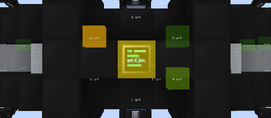
|
| Link Info [LL] | Provides basic information about the link you clicked on:
YouTube: video-title, uploader, thumbnail Image: can show you the image ingame Other: title of the website |
|
| MAtmos | Atmospheric sound generator. It will play sounds according to your surroundings. If you are in the forest - birds will chirp. If you are at low health - you will hear your heart beating. The soundpacks must be put in the "resourcepacks" folder in your modpack directory (see "Finding the modpack-directory"). Available soundpacks can be found here. | - The "MAtmos"-key (F7) conflicts with the default "Mob Spawn Overlay"-key from NEI. You have to change one of these.
- If used with Dynamic Surroundings, set |
| MineMenu | "Mine Menu - Radial menu, 'nuff said". Helps to deal with a lot of conflicting keybindings. Can work both client-side only and on both sides to provide advanced features. | |
| NoFog | Removes all fog. | Incompatible with Angelica's culling, causes only the player's chunk to render. |
| Presence Footsteps [LL] | Alters the way footstep-sounds are played when sprinting, jumping or walking on two different blocks at the same time. | Included in Dynamic Surroundings. |
| SharedProspecting | Share VisualProspecting data between members of a ServerUtilities team. Not needed in 2.9.0 as the functionality has been merged into VisualProspecting. | |
| Sound-Physics | Adds realistic sound attenuation, reverberation and absorption through blocks. | |
| Spark Profiler | Profiling, debugging and latency/TPS source identification tool.
|
|
| TabbyChat 2 [LL] | Completely overhauls the chat window. Resize the chat how you like, create channels/private messages, add filters, see timestamps... | If Big Chat History is installed it will do nothing. |
| VoxelMap [LL] | A minimap. It has the same basic functionality as JourneyMap but with some addtions: choose icons for your waypoints, share waypoints and have a monster-radar even in multiplayer (technicaly JourneyMap has a radar aswell but not in the version shipped with GTNH). | |
| WorldEdit for GTNH | GTNH fork of WorldEdit, which allows copy, cut, paste, alteration of blocks on a massive scale, easy terrain painting and more. | |
| WorldEdit CUI | This client-side user interface (CUI) displays WorldEdit selections instantly in-game. Does NOT go in server files. | |
| Xaero's Minimap | Alternative for Journeymap's minimap functionality. | Not up to date with the main builds of Xaero's Minimap and not being actively maintained or having features/bug fixes backported.
Generally not recommended to run alongside Journeymap. Use one or the other. |
| Xaero's World Map | Alternative for Journeymap's fullscreen world map functionality. | Not up to date with the main builds of Xaero's World Map and not being actively maintained or having features/bug fixes backported.
Generally not recommended to run alongside Journeymap. Use one or the other. |
LiteLoader
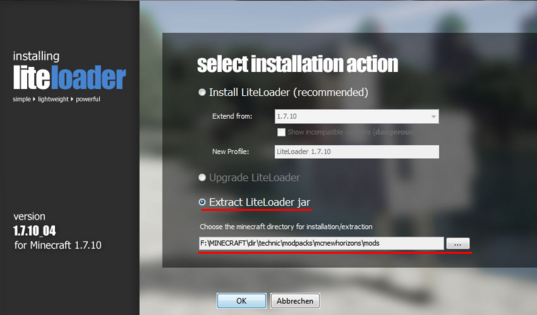
LiteLoader is a modloader like forge however it supports mods with the .liteloader file extension. The installation is similar to Forge but if Forge is already installed (which it is because all mods within GTNH work with Forge) that does not work. In this case you can install LiteLoader as a Forge mod (.jar file extension). To do that run the LiteLoader installer and select "Extract LiteLoader jar". Then choose the mods-folder inside your modpack-directory (see "Finding the modpack-directory") as the extraction-directory.
You have to insert .liteloader mod-files in the mods-folder in your modpack-directory.
Java 17-25
To use LiteLoader with the GTNH Java 17-25 Version you need to use the LiteloaderLoader by Midnight.
The instructions can be found at Midnight145/LiteloaderLoader/INSTALLATION.md.
.jar for use with Forge.Finding the modpack-directory
-
 Technic Launcher - "Modpack Options"
-
 Technic Launcher - "MODPACKS" tab
-
 ATLauncher - Instances Tab
Technic Launcher
- Start the Technic Launcher.
- Select the "MODPACKS" tab.
- Select "GT New Horizons" on the left side.
- Click on "Modpack Options" at the right upper corner.
- Another window will open; click on "Open" at the top of this window.
CurseForge
- Start CurseForge.
- Select "Minecraft" in the menu on the left.
- Right-click on the "GT New Horizons" profile.
- Click on "open folder".
MultiMC/Prism Launcher
- Start MultiMC or Prism Launcher
- Select your instace of GT New Horizons.
- Click on "(Minecraft) Folder" at the right side or right-click on the instance and then "(Minecraft) Folder".
ATLauncher
- Start ATLauncher.
- Click on the large "Instances" button/tab on the right.
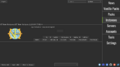
- Find the "GT New Horizons" instance and click on the "Open Folder" button.
Deprecated
These additional mods are no longer needed because their purpose or functionality is now organic to GTNH. For example, Server Utilities is installed by default and does everything that FTB Utilities used to do. Installing any of these mods on the latest versions of GTNH will likely cause compatibility issues, crashes, or bugs.
| Name | Description | Notes |
|---|---|---|
| Big Chat History [LL] | Extends your chat history from 100 to 10,000 lines.
Replaced by Hodgepodge |
- Hodgepodge already extends the chat history to 8191 lines by default and comes with the pack. Relevant
- If TabbyChat 2 is installed this mod will do nothing. |
| CleanView | This mod removes the visual particles of potion effects without removing the effect itself.
Partly replaced by Hodgepodge |
Hodgepodge only removes potion particles from the player, not from other players or mobs which this mod covers. Relevant option in hodgepodge.cfg:
|
| FTB Utilities [FL] | Backup your world scheduled or via command. Add other players as friends and give them permissions to your claimed chunks which also can be chunkloaded. Don't forget FTB libs.
Replaced by Server Utilities |
Needs to be installed on the server and client-side for MP. |
| Neodymium | Better chunk rendering using modern OpenGL. This should improve performance on most hardware.
Replaced by Angelica |
Make sure to use the nomixin variant of the mod, the other might conflict with GTNH. Might not work with certain optifine settings. Performs poorly if Advanced OpenGL (occlusion culling) is turned on. |
| OptiFine | OptiFine is an optimization-mod that increases the performance of the game. Additionally, it provides a lot of features like shader support, VSync, connected textures and a lot of video-settings. If you consider using this, read this before installation. Otherwise you are likely to encounter problems. E7 is better for shaders, but version D6 may be better without shaders.
Replaced by Angelica |
- Note: Optifine D6 does not work with the Java 17-20 version of GTNH.
- Fastcraft 1.23 conflicts with Optifine, you have to upgrade to 1.25 or remove it.
- Fastcraft 1.25 has non-critical conflicts with Optifine E7 when shaders are enabled. Some shadows may be rendered incorrectly (flicker). |
| Dynamic Lights | This mod adds more realistic lighting mechanics such as torches glowing while you hold them in your hand, throwing a glowing object on the ground will light up the area, mobs on fire will emmit light, XP orbs glow as well ect. Since GTNH has hardcore darkness, this mod will ease your life in caves and at night.
Replaced by Angelica's dynamic lighting |
Causes certain NEI related bugs. |
| Sound Filters | Adds reverb to caves and muffles sound sources when behind a wall or under water.
Replaced by Sound-Physics which works with Java 17+ |
Possible incompatibility with Java 19 and/or the Java17-20 version of the pack. More testing required for Java 17, 18, and 20. Crashes when loading world on Java 19. Also crashes when loading world on Java 17.0.8.1_1. |
| Just Enough Calculation | Store recipes and get a "total material cost" for a given over-all recipe. Client-side only, so can be run against a server. Note the keybind comments. Documenation
Similar to NEI auto-crafting as of 2.8.0 |
|
| Smooth Font | Optimizes the way text is rendered and provides options to scale the text and change the font.
Replaced by Angelica's custom fonts |
When using FastCraft "enableFontRendererTweaks" has to be set to false. For Angelica, set "enableFontRenderer" to false, then restart GTNH.
In order to make your new font choice compatible with BetterQuesting, make sure to configure BetterQuesting (Pause -> Mod Options -> BetterQuesting -> general) and set Text Width Correction to something like 1.1 or 1.2 (Source) |
| FPS Reducer | Reduces the CPU/GPU load when you are AFK or Minecraft is running in the background. In this case the mod suppresses the game sound.
Replaced by Angelica's FPS reducing features. |
Now built-in to Angelica as of 2.9.0 onward. |