GT New Horizons · Getting started
Resource Packs
The following resource packs have been confirmed to work with GTNH, but if you encounter issues be sure to test with the packs disabled. If you get lighting errors on the face of machines after installing a texture pack, try setting renderGlowTextures=true to renderGlowTextures=false in ./config/GregTech/Client.cfg (if you don't know how to find this file, refer to this page). Additionally, it is recommended that you place any GTNH-specific texture packs prior to global replacers (such as Faithful). GTNH is in active development, while many older texture packs for 1.7.10 are not; missing animated textures in particular can be avoided in this way.
Additional Mods and Shaders may also be of interest to players looking to customize their GTNH experience.
Accessibility and Utility
Resource packs that offer some kind of functionality, not just aesthetics. Good examples are ore outliners, tiered machine colors, and audio adjustments.
| Icon | Name | Team | Scope | Version | Links |
 |
BetterClick | Fox | Replaces the loud high-pitched clicking sound with a softer low-pitched clicking sound. | All | Download Source |
 |
Colored GregTech Screwdriver and File | jack_glows, LunarLambda | Simple resource pack changing the color of the screwdriver handle to blue and the handle of the file to red. You'll never confuse them again. | 2.8.X, 2.9.X | Download Source |
 |
GTNH Colored Machines | imTheSupremeOne | GT6-like colored textures for each tier for better visibility (only patches select textures - everything else is vanilla) | 2.8.X | Download Source |
 |
GTNH Machine Textures | xXjudeXx | Overhauls machine textures to reflect their actual material colors, ensuring visual consistency across all machines, including those from GT++, GoodGenerator, KekzTech, and Electro-Magic Tools. | 2.8.X | Download Source |
 |
Invisible Healing Axe | Ranzu | Makes the Healing Axe nearly invisible to prevent it from blocking the screen when held in off-hand. | All | Download Source |
 |
GTNH-OutlinedOres | schneid3306, Ranzu | Adds a solid border that matches the color of the core. Two versions available: one for vanilla GTNH and one for Modernity (ABKQPO). | All | Download Source |
 |
gtnh-quieter-chests | SkilledAlpaca | Lowers the volume of the chest open and close sounds. | All | Download Source |
Dark Mode
Resource packs that change GUIs to light text on a dark background instead of the standard dark text on light.
| Icon | Name | Team | Scope | Version | Links |
 |
Dark GTNH Reimagined | Kuliiuu | Dark-themed UI resource pack focusing on readability, visual consistency, and a clean modern interface. Works well with Modernity (ABKQPO). | 2.9.X | Download Source |
 |
Scuffed GTNH Dark | Albi, Kuliiuu | Dark Mode for GTNH with custom progress bars. Recommended to use with Unity and Zedarrian Technology. No longer updated - see Dark GTNH Reimagined instead. | 2.8.X | Download Source |
 |
Shadow-UI | Ranzu | Darker user interfaces. Two versions available: one for vanilla GTNH and one for Modernity (ABKQPO). Includes additional tweaks and fixes in separate packs, and supports GTNH addon mods. | 2.8.X, 2.9.X | Download Source |
 |
Glass-UI | S4mpsa | Adds a transparent dark UI. | 2.8.X, 2.9.X | Download Source |
Upscaling and Restyles
Resource packs that aim to change the overall look, either with new art or higher resolution.
| Icon | Name | Team | Scope | Version | Links |
 |
AE2 Dark Mode | Ranzu | Darker AE2 blocks. Includes textures for AE2 additions and GTNH addon mods. | 2.8.X, 2.9.X | Download Source |
 |
Borosillycat Glass Pack | Angry3vilbot | Replaces the texture of borosilicate glass block variants with a semi-transparent profile picture of sillycat4725 | 2.8.X, 2.9.X | Download Source |
 |
Dynamic Duo GTNH | Alexdoru | Smooth vanilla textures, 32x textures for crafting items, and clean fonts. Composite of GT and Faithful textures, among others. | 2.8.X | Download |
 |
Slightly Improved Font (32x) | Lat | This resource pack adds a slightly improved version of vanilla Minecraft font (32x version) | Untested | Download Source |
 |
GTNH Faithful Textures | Ethryan | Large kitchen-sink texture pack with everything needed to scale it to x32. | 2.8.X, 2.9.X | Download Source |
 |
GTNH FTI Faithful ResourcePack | Eldrinn-Elantey | Faithful textures with some differences. | 2.8.X, 2.9.X | Download Source |
 |
GTNH Textures Usernm | Usernm0 | Circuits and other components, casings, coils, coins, etc. 32x32 (only patches select textures). | 2.8.X | Download Source |
 |
GTNHRefreshed | BlueHero233 | Backport of ULSTICK's GregTech Refreshed, with some additions to fit GTNH items. Recommended to use with Modernity. | 2.8.X | Download Source |
 |
Ivelitex | Ivelieu | Applied Energistics 2 GUIs, some other GUIs, and minor tool changes. Fractal decorative art backgrounds. | 2.8.X | Download Alternate Source |
 |
John Smith: Alk-GTNH | Alkalus | GTNH fork of John Smith: Technician's Remix. | 2.7.X | Download Source |
 |
Minimalist Technology | Pyrolusite, XxinsanityxX | GregTech 5 & IC2. 16x clean, smooth textures. | 2.8.X | Download Source |
 |
Modernity (GTNH) | ABKQPO and Modernity team | Updates all GTNH textures to the style of Minecraft 1.20.1+. | 2.8.X, 2.9.X - WIP | Download Source |
 |
Modernity | AstroTibs | Updates most non-GTNH textures to the style of modern Minecraft. | 2.8.X | Download |
 |
Stellar Fusion | Magentanide | Faithful resource pack supplement that adds 32x32 textures for GregTech, GT++, and the GTNH Core Mod. Requires Faithful. | 2.7.X | Download Source |
 |
UU-Tex | Forked: Revurii, Original: Jimbno |
Retextures multiblock machines, circuit tiers, and parts. Overall darker appearance and extra animations. Download as a zip from the source page. | 2.8.X | Download Source |
 |
Wily-bit's-GTNH-tex | Wily bit | A resource pack that changes GTNH textures. | 2.8.X | Download Source |
 |
Zedtech-GTNH | origami2147 | A modern, Zedtech-style resource pack for GTNH. | 2.8.X, 2.9.X | Download Source |
Resource Pack Documentation
This section contains documentation, setup guides, and technical references related to GTNH resource packs, including configuration formats, metadata systems, compatibility features, update integration, and GTNHLib-supported functionality for pack developers and players.
Update Notifier
The Resource Pack Update Notifier allows compatible resource packs to automatically notify players when a newer version is available on GitHub Releases.
When a supported resource pack is enabled, GTNHLib can check for updates and display an in-game notification with a clickable release link.

Features
- Checks enabled resource packs for updates automatically
- Uses GitHub Releases as the update source
- Only checks once per game session
- Compatible with GTNH version lines (example:
2.8.X) - Console-only debug logging (no chat spam)
- Supports manual update checks through commands
Enable / Disable
The notifier can be enabled or disabled in the GTNHLib client configuration:
enableResourcePackUpdateCheck=true
If disabled, automatic update checks will not run.
Manual Update Check
Players can manually trigger update checks using:
/resourcepack updateCheck
To bypass the temporary cooldown after failed requests:
/resourcepack updateCheck force
Additional debug and utility commands can be viewed with:
/resourcepack help
When Notifications Appear
An update notification will only appear if:
- The resource pack is currently enabled
- The resource pack opted in through
pack.mcmeta - A newer compatible release exists
- The release targets the player's GTNH version line
- The release version is newer than the installed version
Resource Pack Author Setup
1. Add metadata to pack.mcmeta
Add the following top-level object:
"gtnh_resource_pack_updater": {
  "schema": 1,
  "pack_name": "<name>",
  "pack_version": "<version>",
  "pack_game_version": "<pack_game_version>",
  "source": {
    "type": "github_releases",
    "owner": "<github_owner>",
    "repo": "<repository_name>"
  }
}
|
Multiple GTNH versions may be supported using semicolon-separated values: "pack_game_version": "2.8.X;2.9.X"
|
Example:
{
  "pack": {
    "pack_format": 1,
    "description": "§8GTNH v2.9.X §f/ §3Pack v5.21 §f- §2Modernity version §aby Ranzu"
  },
  "gtnh_resource_pack_updater": {
    "schema": 1,
    "pack_name": "ShadowUI",
    "pack_version": "5.21",
    "pack_game_version": "2.9.X",
    "source": {
      "type": "github_releases",
      "owner": "Ranzuu",
      "repo": "Shadow-UI"
    }
  }
}
2. Add release metadata
Every GitHub Release must contain an asset named exactly:
gtnh-pack-update.json
{
  "schema": 1,
  "pack_game_version": "<pack_game_version>",
  "pack_version": "<version>"
}
|
Multiple GTNH versions may be supported using semicolon-separated values: "pack_game_version": "2.8.X;2.9.X"
|
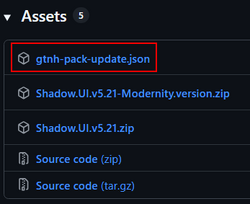
Example:
{
  "schema": 1,
  "pack_game_version": "2.9.X",
  "pack_version": "5.21"
}
This file is used to determine:
- Which GTNH version line the release supports
- Which resource pack version the release contains
 Important: | Releases without this file are ignored completely |
Technical Details
- The notifier compares releases against the player's active GTNH version line.
- Example:
2.8.X. Only releases targeting that version line will be considered compatible.
- Example:
- Versions are compared numerically.
- Example:
5.36 > 5.34
- Example:
- Detailed information is written only to the console/log files, including:
- Missing metadata fields
- Invalid JSON
- Network failures
- Cooldown skips
- No matching compatible releases
- No debug information is sent to in-game chat.
Available on GTNHLib 0.9.24 (with later fixes). Added by Ranzu in GTNHLib #260.
ModularUI2
With the addition of ModularUI2, users gained the ability to create or override custom themes.
Other Useful Information
- Minecraft Wiki Formatting codes page
- Minecraft Wiki Resource Pack page (keep in mind GTNH is on 1.7.10, so the newer resource pack format is different)